OpenAI Secure MCP Tunnel Explained: Private AI Agents Without Public MCP Servers
OpenAI just made one of the most practical AI agent problems a lot more interesting.
On June 26, 2026, OpenAI published a developer post about Secure MCP Tunnel, a new way to connect private Model Context Protocol servers to OpenAI products without turning those servers into public internet services.
That sounds technical. And it is.
But the bigger story is simple: companies want ChatGPT, Codex, and API-based agents to work with internal tools, databases, runbooks, ticket systems, deployment platforms, and business workflows. The problem is that many of those systems live behind firewalls, private networks, service meshes, VPNs, or local developer machines.
Until now, teams often had to make an uncomfortable choice. Either expose an MCP server publicly, build custom proxy infrastructure, use a third-party tunneling vendor, or wire up broader network access than the AI integration really needed.
OpenAI Secure MCP Tunnel is designed to avoid that messy tradeoff.
In my view, this is not just a networking update. It is a sign that the AI agent market is moving from demos to operational reality. Once agents start touching real company systems, the boring parts matter: firewalls, permissions, audit logs, OAuth, backpressure, monitoring, and who gets blamed when something breaks at 2 a.m.
Quick Summary
| Item | What it means |
|---|---|
| Product | OpenAI Secure MCP Tunnel |
| Published | June 26, 2026 |
| Main use case | Connect private MCP servers to OpenAI products without public inbound access |
| Works with | Supported OpenAI surfaces such as ChatGPT, Codex, and the Responses API |
| Core idea | A customer-run tunnel client makes outbound HTTPS requests to OpenAI and forwards MCP calls locally |
| Best for | Enterprise AI agents, internal developer tools, private APIs, and secure workflow automation |
What Is OpenAI Secure MCP Tunnel?
OpenAI Secure MCP Tunnel is a secure connection pattern for private MCP servers.
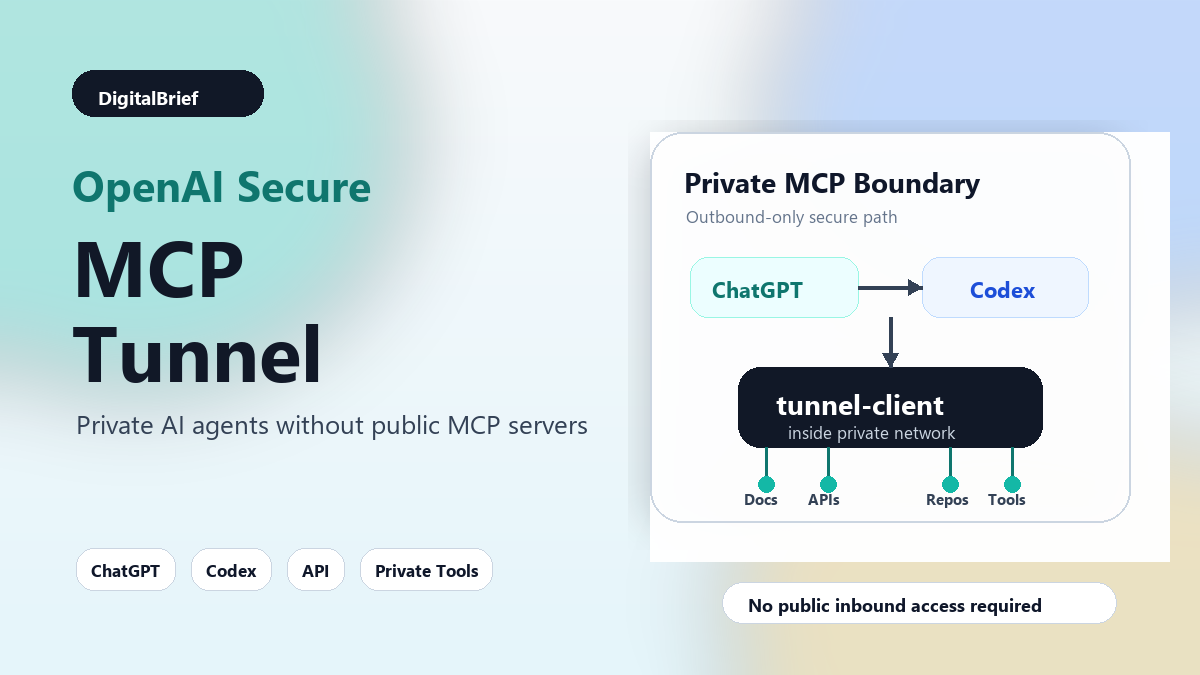
Instead of asking your MCP server to accept public traffic, you run a small tunnel-client inside the private environment that already has access to that server. The client opens an outbound HTTPS connection to OpenAI, polls for queued work, forwards MCP requests to the local private server, and sends responses back through the same tunnel.
OpenAI describes the goal as keeping private servers private while still giving ChatGPT, Codex, and other OpenAI products a normal MCP request path.
That distinction matters.
Most companies are not nervous about AI agents because they dislike automation. They are nervous because useful automation usually needs access to sensitive systems. A sales agent may need CRM data. A coding agent may need repository context. A support agent may need ticket history. A data agent may need internal dashboards. A DevOps agent may need deployment metadata.
Those are exactly the systems companies usually do not want sitting on a public endpoint.
Why MCP Matters Here
MCP, or Model Context Protocol, has become one of the most important standards in the AI tools space.
The basic idea is to give AI systems a common way to connect to external tools and data sources. Instead of building a custom integration for every AI app and every business tool, developers can expose tools through an MCP server. AI products that understand MCP can then discover and call those tools.
OpenAI has already tied MCP into several product directions. Its Apps SDK announcement explained that apps in ChatGPT are built on MCP. Its Codex update also highlighted MCP servers and plugins as part of how agents gather context and take action across tools.
So the Secure MCP Tunnel update lands at an important moment.
MCP is no longer just a developer curiosity. It is becoming part of how AI tools connect to the real working world.
The Problem OpenAI Is Trying To Solve
Let us say a company has an internal MCP server that can search customer documentation, fetch support tickets, read deployment status, or create a Jira issue.
That server might run inside Kubernetes. It might sit behind a corporate firewall. It might live on a developer machine. It might only be reachable from a private VPC.
If ChatGPT or Codex needs to call that server, how does the request get there?
Before Secure MCP Tunnel, teams usually had a few options:
- Expose the MCP server publicly and secure it very carefully.
- Set up a reverse proxy or custom gateway.
- Use a third-party tunneling product.
- Build VPN or network peering access.
- Give up and keep the integration local.
None of these are perfect.
A public endpoint increases the attack surface. A third-party tunnel adds another vendor to security review. VPNs and peering can be too broad for a narrow AI tool integration. A custom proxy adds engineering work, operational ownership, and another place for bugs to hide.
OpenAI Secure MCP Tunnel offers a narrower path: keep the MCP server private, run a client beside it, and let that client make the outbound connection.
How Secure MCP Tunnel Works
The flow is fairly easy to understand once you strip away the protocol language.
- A team creates or manages an OpenAI-hosted MCP tunnel endpoint in Platform tunnel settings.
- The team runs
tunnel-clientinside the network that can already reach the private MCP server. - The client is configured with a tunnel identity and the private server address.
- OpenAI products send MCP requests to the OpenAI-hosted tunnel endpoint.
- The client long-polls for queued work, forwards JSON-RPC requests locally, and posts responses back through the tunnel.
The important part is that the private server does not need inbound internet access.
The host running the tunnel client needs outbound HTTPS access to OpenAI. It also needs local reachability to the MCP server. That is a much narrower network story than opening public traffic to the internal tool itself.
Why Outbound-Only Connectivity Is A Big Deal
Outbound-only connectivity is not glamorous, but enterprise teams understand it.
Most corporate environments already allow carefully controlled outbound HTTPS. It fits better with existing firewall rules, proxy setups, and platform policies. It also gives security teams a clearer place to review behavior: what client is running, what it can reach locally, and which OpenAI-hosted tunnel endpoint it talks to.
OpenAI says it started with long-polling because it is operationally familiar and gives the client a natural backpressure point. In plain English, the private-side client can ask for work at a pace it can handle instead of letting requests pile up wildly.
That is the kind of detail developers appreciate after the demo is over.
Secure MCP Tunnel Vs Other Approaches
| Approach | Pros | Tradeoffs |
|---|---|---|
| Public MCP server | Simple to reach from hosted AI tools | Creates public attack surface and heavier security burden |
| Third-party tunnel | Fast to set up | Adds another vendor, review process, and operational dependency |
| VPN or peering | Strong for broad private network access | Often too broad and complex for one AI connector |
| Custom proxy | Flexible and fully controlled | Requires engineering, maintenance, monitoring, and security hardening |
| OpenAI Secure MCP Tunnel | Narrow outbound-only path for supported OpenAI products | Still requires OpenAI tunnel permissions, workspace association, and a healthy client |
What Developers Need Before Using It
OpenAI’s documentation lists a few practical requirements.
You need a tunnel_id from Platform tunnel settings, a runtime API key for tunnel-client, and an MCP server that the client can reach over stdio or HTTP from inside your network.
There are also permission details. Platform tunnel permissions and ChatGPT developer-mode access are separate. Creating or editing a tunnel requires the relevant tunnel management permission. Running the client or selecting the tunnel in connector settings requires tunnel use permission. For ChatGPT Enterprise or Edu, a workspace admin also needs to grant developer-mode or custom connector access.
This is one of the most important practical notes in the whole release.
Many AI tool rollouts fail not because the code is impossible, but because the permission model is scattered across product surfaces. Here, teams need to coordinate Platform organization access, ChatGPT workspace settings, and whatever internal access model protects the MCP server itself.
What This Means For ChatGPT, Codex, And The Responses API
The biggest benefit is that OpenAI products can now reach private tools through a supported tunnel pattern instead of forcing every team to invent its own path.
For ChatGPT, this could make custom connectors more useful inside companies that keep their data and tools behind private boundaries.
For Codex, the implications are especially interesting. Coding agents become far more useful when they can inspect internal docs, deployment history, service ownership maps, feature flags, incident notes, and repo-specific tools. But most engineering organizations do not want all of that exposed through public endpoints. A private MCP tunnel gives Codex a cleaner way to reach those tools when the organization allows it.
For the Responses API, this helps teams building custom AI workflows that need private tool access without shipping every private API integration through a public gateway.
Real-World Use Cases
Here are the use cases that stand out to me.
1. Internal Developer Assistant
A company can expose internal engineering tools through an MCP server: service catalog lookup, deployment status, incident history, runbook search, feature flag inspection, and repository metadata.
Codex or ChatGPT can then answer questions like, “Why did this service fail last week?” or “Which team owns this API?” without the company turning those internal systems into public services.
2. Enterprise Knowledge Search
An MCP server can sit next to internal docs, tickets, contracts, or data catalogs. The tunnel lets approved OpenAI products query those sources through the private server.
This is useful for research assistants, support workflows, legal reviews, and onboarding agents.
3. Customer Support Automation
A support agent may need ticket history, product entitlements, account notes, and internal troubleshooting docs. Secure MCP Tunnel could help route those tool calls through a private connector instead of exposing customer support infrastructure publicly.
4. DevOps And Platform Operations
Platform teams could use MCP to expose narrow operational tools: read-only cluster status, deployment metadata, incident timelines, or approved automation actions.
The key word is narrow. This should not become a general-purpose bridge into the entire network.
5. Private REST API Access Through Harpoon
OpenAI also mentions Harpoon, an embedded MCP server in tunnel-client that can expose approved REST targets by label. This is useful because not every internal workflow is already packaged as an MCP server.
Harpoon is not meant to be an open proxy. The caller cannot choose random hosts. The customer configures specific targets and methods.
Benefits For Businesses
| Benefit | Why it matters |
|---|---|
| Private servers stay private | Teams can avoid public inbound access for sensitive MCP servers |
| Narrower security review | The tunnel path is more focused than broad VPN or network peering |
| Better agent usefulness | AI agents can work with real internal tools, not just public web data |
| Cleaner developer experience | Teams get a supported pattern instead of custom proxy work |
| More enterprise-ready AI | Fits the governance-heavy world where AI agents are now being deployed |
Risks And Limitations
Secure MCP Tunnel does not magically make AI agents safe.
It solves a reachability problem. It does not remove the need for permission design, tool scoping, audit strategy, prompt injection defenses, OAuth planning, and careful rollout.
OpenAI’s own workspace agent materials emphasize enterprise controls, app access, monitoring, and safeguards against misleading external content such as prompt injection. That context matters because any agent that can call internal tools needs boundaries.
Here are the main risks I would watch:
- Overbroad MCP tools: If a tool can do too much, the tunnel will faithfully carry risky requests.
- Weak internal auth: Private network location should not be the only protection for sensitive actions.
- OAuth complexity: OpenAI notes that the MCP server can remain private, but the authorization server still needs to be reachable by the component handling OAuth.
- Operational dependency: If
tunnel-clientis not running or healthy, requests fail. - Permission confusion: Teams need to align Platform permissions, ChatGPT workspace permissions, and internal app permissions.
Pros And Cons
| Pros | Cons |
|---|---|
| Keeps private MCP servers off the public internet | Requires setup across OpenAI Platform and ChatGPT workspace controls |
| Uses outbound HTTPS, which enterprises already understand | Only helps supported OpenAI product surfaces |
| Works with local stdio or HTTP MCP servers | The tunnel client becomes an operational component to monitor |
| Supports a more realistic path for enterprise AI agents | Does not replace proper tool permissions or auditing |
| Can extend to allowlisted REST callouts through Harpoon | OAuth and identity flows can still need extra architecture work |
SEO And Market Angle: Why This Topic Is Heating Up
This update sits at the crossing point of several high-interest searches:
- AI agents for enterprise
- MCP server security
- ChatGPT custom connectors
- Codex private tools
- OpenAI Responses API tools
- AI workflow automation
- Secure AI agents
Honestly, most people still talk about AI agents as if the hard part is prompting.
That is only partly true.
The real enterprise problem is controlled action. Can the agent reach the right tool? Can it do only the approved task? Can the admin see what happened? Can the security team understand the path? Can the engineering team debug failures?
Secure MCP Tunnel is interesting because it attacks one specific piece of that puzzle: secure reachability.
Keyword Strategy
Primary keyword: OpenAI Secure MCP Tunnel
Secondary keywords: private MCP servers, ChatGPT MCP connector, Codex MCP tools, OpenAI MCP tunnel, secure AI agents, MCP server security
Long-tail keywords:
- how OpenAI Secure MCP Tunnel works
- connect private MCP server to ChatGPT
- OpenAI tunnel-client explained
- private MCP server for Codex
- secure MCP connectors for enterprise AI agents
- ChatGPT custom connector private network
Semantic keyword cluster: AI agents, enterprise automation, private network, outbound HTTPS, JSON-RPC, MCP tools, tunnel client, OpenAI Platform, ChatGPT developer mode, Responses API, Codex, internal tools, OAuth, audit logs, prompt injection, access control.
How Teams Should Evaluate It
If your team is considering Secure MCP Tunnel, I would start with a small and boring use case.
Do not begin with a write-heavy production workflow. Begin with a read-only tool that exposes useful but low-risk context, such as internal documentation search, service ownership lookup, or deployment status.
Then ask these questions:
- Which MCP tools are exposed?
- Are they read-only or write-capable?
- Who can invoke them from ChatGPT, Codex, or the API?
- What logs will security and platform teams review?
- What happens if the tunnel client disconnects?
- How are OAuth and user identity handled?
- Can the MCP server enforce its own permissions?
- What is the rollback plan?
Most people miss this: a tunnel is not a permission model. It is a transport path. You still need the MCP server and the connected system to enforce the right rules.
Future Predictions
This update points toward a larger trend: AI platforms are becoming integration platforms.
In 2024 and 2025, the conversation was mostly about model quality. In 2026, the bigger business question is how safely these models can work across real tools.
I expect to see three things happen next.
First, more companies will package internal tools as MCP servers. The ones that win will keep the tool surface small, documented, and permission-aware.
Second, AI security reviews will become more like API security reviews. Teams will ask what the model can call, what each tool can do, what data can leave, and how actions are logged.
Third, developer tools like Codex will become much more powerful inside enterprises because they will not be limited to code alone. They will be able to work with internal runbooks, docs, services, and operational metadata.
That is where things get interesting.
FAQ
What is OpenAI Secure MCP Tunnel?
OpenAI Secure MCP Tunnel is a way to connect private MCP servers to supported OpenAI products without exposing those servers publicly. A customer-run tunnel client makes outbound HTTPS requests to OpenAI and forwards MCP calls inside the private network.
What problem does Secure MCP Tunnel solve?
It solves the problem of hosted AI products needing to reach private tools and data sources. Instead of opening public inbound access to an MCP server, teams can keep the server private and route requests through an outbound tunnel client.
Does Secure MCP Tunnel work with ChatGPT?
Yes, OpenAI says supported products include ChatGPT. Teams still need the right ChatGPT developer-mode or custom connector permissions, depending on their plan and workspace settings.
Does it work with Codex?
OpenAI mentions Codex as one of the supported surfaces that can use private MCP servers through the tunnel-backed path.
Does it work with the Responses API?
OpenAI describes the tunnel as relevant for ChatGPT, Codex, the Responses API, and other supported OpenAI surfaces that need to call private MCP servers.
Do I still need an MCP server?
Yes. Secure MCP Tunnel is the connection path. You still need an MCP server that the tunnel client can reach over stdio or HTTP from inside your private environment.
Is Secure MCP Tunnel a VPN?
No. It is not a broad private network bridge. It is a narrow tunnel pattern for configured MCP requests and, in some cases, allowlisted HTTP callouts.
Does the private MCP server need public internet access?
No. The private MCP server does not need to listen publicly. The host running tunnel-client needs outbound HTTPS access to OpenAI and local access to the private MCP server.
What is tunnel-client?
tunnel-client is the customer-run component that sits inside the private environment, polls OpenAI for queued MCP work, forwards requests locally, and returns responses through the tunnel.
What is Harpoon in Secure MCP Tunnel?
Harpoon is an embedded MCP server inside tunnel-client that can expose approved REST targets by label. It is designed for narrow, allowlisted HTTP callouts, not arbitrary proxying.
Is Secure MCP Tunnel enough for enterprise security?
No. It helps with secure reachability, but teams still need proper tool permissions, identity, logging, review processes, prompt injection safeguards, and operational monitoring.
Who should use Secure MCP Tunnel?
It is most useful for companies that want AI agents or OpenAI products to work with private internal tools without exposing those tools through public endpoints.
Suggested Visuals
- A simple diagram showing ChatGPT, Codex, and API requests flowing through an OpenAI-hosted tunnel to
tunnel-clientinside a private network. - A comparison chart: public endpoint vs VPN vs third-party tunnel vs Secure MCP Tunnel.
- A checklist graphic for enterprise MCP rollout: permissions, tool scope, logging, OAuth, monitoring, rollback.
Final Thoughts
OpenAI Secure MCP Tunnel is not the flashiest AI launch of the year, but it may be one of the more practical ones for serious AI agent adoption.
The reason is simple: useful agents need tools. Useful business tools are often private. And companies do not want to punch unnecessary holes in their network just to make an AI demo work.
Secure MCP Tunnel gives teams a more realistic path. Keep the MCP server inside the private boundary. Run an inspectable client near it. Let approved OpenAI products send requests through a narrow outbound tunnel. Then keep the real security work where it belongs: permissions, tool design, monitoring, and governance.
For developers, this is worth watching closely. For businesses, it is a reminder that the next wave of AI productivity will not come only from smarter models. It will come from safer, better-connected systems.
If you are building AI workflows inside a company, start mapping your internal tools now. The teams that understand their MCP surface, permissions, and private API boundaries will move much faster as agent platforms mature.