API to MCP Explained: Why AI Agents Are Turning APIs Into Tools
APIs were built for software.
MCP servers are being built for AI agents.
That small difference is becoming a very big deal.
On June 19, 2026, a Product Hunt launch called API to MCP started trending with a simple promise: turn REST, GraphQL, SaaS, and internal business APIs into hosted MCP servers that AI agents can use in minutes.
The product itself is interesting.
But the bigger trend is even more important.
AI agents are moving from chat windows into real workflows. They are expected to search databases, update CRMs, create tickets, pull reports, schedule actions, and work across business tools.
For that to happen safely, agents need clean ways to access tools.
That is where API to MCP becomes one of the most practical AI infrastructure topics of 2026.
After looking at the current Product Hunt signal, the official Model Context Protocol documentation, Anthropic’s original MCP announcement, Google Cloud’s MCP explainer, and recent API-to-MCP implementation guides, this feels like a trend every founder, developer, and SaaS team should understand.
Not because every company needs to rebuild its API stack tomorrow.
Because AI agents are creating a new question for every API-first business:
Can an AI agent understand and use your product safely?
| Quick answer | Why it matters |
|---|---|
| API to MCP means wrapping existing APIs as agent-usable tools | It helps AI apps use business systems without custom integration work every time. |
| MCP is an open standard for connecting AI apps to external systems | It gives developers a shared language for tools, data, prompts, and workflows. |
| The trend is rising because AI agents need action layers | Chatbots are useful, but agents need permissioned access to real software. |
| The main risk is exposing too much power too quickly | Teams need scopes, approvals, audit logs, rate limits, and careful tool design. |
What Is API to MCP?
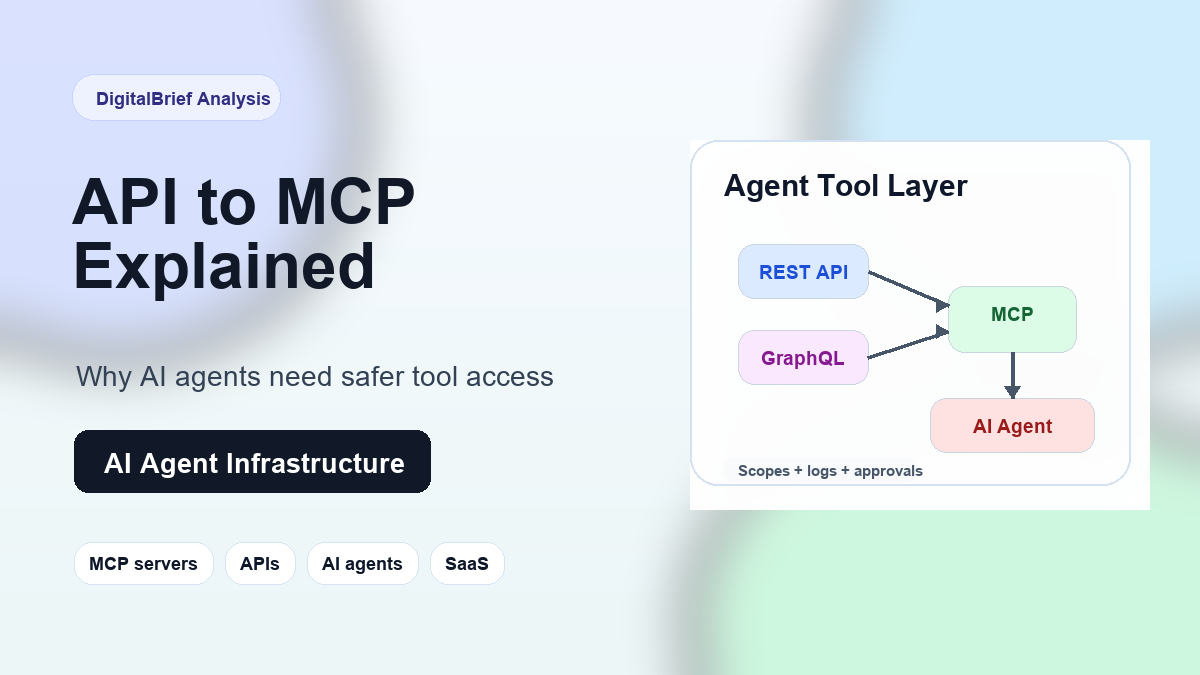
API to MCP is the process of converting an existing API into an MCP server so an AI agent can discover and use it as a set of tools.
In plain English, it means this:
You already have software that exposes an API.
That API might create invoices, fetch customer data, update a project board, query analytics, or send emails.
An MCP server sits in front of that API and describes the available actions in a way an AI application can understand.
Instead of asking a developer to write a custom integration for every AI assistant, every workflow, and every model, MCP gives the agent a standard way to connect.
The official Model Context Protocol documentation describes MCP as an open-source standard for connecting AI applications to external systems, including data sources, tools, and workflows.
Anthropic’s original MCP announcement framed it as a way to build secure, two-way connections between data sources and AI-powered tools.
That sounds technical, but the user experience is simple.
An AI agent can ask, “What tools are available?”
The MCP server can answer, “You can search customers, create a ticket, summarize revenue, or update a record.”
Then the agent can call those tools with structured inputs instead of guessing how a raw API works.
Why API to MCP Is Trending Now
The timing makes sense.
AI agents are no longer just experimental demos.
Developers are using coding agents. Support teams are testing agentic customer service. Sales teams want automated research. Operations teams want AI workflows that can actually touch systems, not just write summaries.
That creates a new bottleneck.
Most companies already have APIs.
But most APIs were designed for human developers, not autonomous AI agents.
A normal API expects a developer to read documentation, understand authentication, choose endpoints, handle errors, and wire business logic into an app.
An AI agent needs more guidance.
It needs clear tool names, safe inputs, useful descriptions, predictable outputs, and strong permission boundaries.
That is why the API to MCP Product Hunt launch caught attention. It promises to turn REST, GraphQL, SaaS, and internal APIs into hosted MCP servers, with support for agent-facing clients like ChatGPT, Claude, Codex, Cursor, VS Code, and custom agents.
Honestly, this is the exact kind of boring-sounding infrastructure trend that can become huge.
The front-end story is “AI agents will do work for us.”
The back-end reality is “agents need safe, well-described access to tools.”
API to MCP sits right in the middle.
API vs MCP: What Is the Difference?
An API is a contract for software systems.
An MCP server is a contract for AI applications that need to use tools and context.
They are related, but they are not the same thing.
| Area | Traditional API | MCP server |
|---|---|---|
| Primary user | Human developers and software apps | AI apps, agents, and agentic IDEs |
| Interface style | Endpoints, methods, payloads, SDKs | Tools, resources, prompts, structured context |
| Discovery | Developer reads docs | AI client discovers available tools |
| Best for | App-to-app integration | Agent-to-tool integration |
| Main risk | Bad integration or leaked keys | Overpowered agents, unsafe tool calls, prompt injection |
A useful way to think about it is this:
An API tells software what is possible. An MCP server tells an AI agent what it is allowed to do.
That permission layer matters.
If you expose your entire internal API to an agent, you may create more risk than value.
If you expose a small set of carefully designed tools, the agent can be genuinely useful without becoming dangerous.
How API to MCP Works
The exact implementation depends on the platform, but the general workflow is easy to understand.
- Start with an existing API. This could be a public REST API, GraphQL API, internal service, SaaS API, or OpenAPI specification.
- Choose which actions should become tools. Not every endpoint should be exposed. A good MCP server usually starts with a small, safe surface.
- Define tool names and descriptions. The agent needs human-readable context so it understands when and why to call a tool.
- Map inputs and outputs. Parameters need schemas, validation, and clean response formats.
- Add authentication and scopes. OAuth, API keys, bearer tokens, and account-level permissions decide what the agent can access.
- Connect the MCP server to AI clients. The server can then be used by tools like Claude, ChatGPT, Cursor, Codex-style agents, VS Code, or custom systems.
- Monitor usage. Logs, approvals, rate limits, and auditing become essential once agents can take actions.
What stood out to me while researching this is how much of the work is not just technical conversion.
It is product thinking.
A bad API-to-MCP wrapper simply exposes endpoints.
A good one exposes useful tasks.
For example, “POST /customers/{id}/notes” is an endpoint.
“Add a customer note after summarizing a support call” is a tool that an agent can understand.
That difference will separate useful MCP servers from noisy ones.
Real-World Use Cases for API to MCP
API to MCP is especially useful when a business already has API-accessible systems but wants AI agents to operate across them.
| Use case | What the agent can do | Why MCP helps |
|---|---|---|
| Customer support | Search tickets, draft replies, update customer records | Gives the agent scoped access to support data and actions |
| Sales operations | Find leads, update CRM stages, summarize account history | Turns CRM API functions into agent-friendly tools |
| Developer workflows | Create issues, inspect deployments, query logs, run checks | Lets coding agents work beyond the code editor |
| Marketing analytics | Pull campaign data, compare channels, create reports | Connects agents to live business metrics |
| Internal automation | Trigger workflows, route approvals, generate summaries | Makes existing internal APIs usable from natural language |
For SaaS companies, the opportunity is obvious.
If customers are bringing AI agents into their workflows, your product needs to be easy for those agents to use.
Today, companies build public APIs because developers need integrations.
Tomorrow, they may build MCP servers because AI agents need tool access.
Why SaaS Companies Should Pay Attention
Most SaaS teams already understand the value of APIs.
APIs help partners integrate. They help customers automate. They help developers build on top of your product.
MCP adds a new layer.
It asks whether your product can be used by an AI assistant inside the customer’s actual workflow.
Imagine a project management app.
A user might ask an AI agent, “Find all blocked tasks from this sprint, summarize why they are blocked, and draft follow-up messages for each owner.”
Without tool access, the agent can only give generic advice.
With a well-designed MCP server, it can fetch live task data, reason over it, and prepare useful next steps.
That is a much stronger product experience.
Google Cloud’s MCP guide explains the standard as a bridge that lets AI move beyond static knowledge and work with current data, tools, and services.
That is the business case in one sentence.
Agents become more useful when they are connected to real systems.
Benefits of API to MCP
The benefits are practical, especially for teams already investing in AI automation.
- Faster agent integrations: Teams can expose existing APIs without building one-off connectors for every AI client.
- Better tool discovery: Agents can understand available tools instead of relying on raw documentation.
- Reusable infrastructure: One MCP server can support multiple AI apps, depending on the setup.
- More useful internal agents: Company agents can work with live systems instead of static knowledge bases.
- Cleaner security boundaries: Well-designed MCP servers can expose only the tools and scopes an agent actually needs.
- Improved customer experience: SaaS users can interact with products through AI assistants and workflow agents.
In my experience, the biggest win is not speed.
It is consistency.
When every team builds its own agent integration differently, governance gets messy fast.
A standard interface gives companies a better starting point.
Risks and Limitations
This is where teams need to be careful.
API to MCP is powerful because it lets AI agents do things.
That is also why it can be risky.
| Risk | What can go wrong | Practical fix |
|---|---|---|
| Too many exposed tools | The agent gets access to actions it does not need | Start with a small allowlist of safe tools |
| Weak permissions | A user or agent can access data outside its role | Use OAuth scopes, account tokens, and role checks |
| Prompt injection | Malicious content tricks an agent into unsafe tool use | Separate instructions from data and require confirmations for sensitive actions |
| Poor tool descriptions | The agent calls the wrong tool or misunderstands the output | Write clear descriptions and test with real tasks |
| No audit trail | Teams cannot explain what the agent did later | Log requests, responses, user IDs, and approvals |
Most people miss this: converting an API to MCP is not automatically a security upgrade.
It can be safer if designed well.
It can also be dangerous if it blindly exposes too much functionality.
The best production model is usually narrow.
Give the agent the smallest useful tool surface.
Add permissions.
Log everything important.
Require human approval for destructive actions.
API to MCP SEO Keyword Strategy
If you are tracking this topic for search demand, the keyword cluster is still early but promising.
Searchers are likely to come from developer, SaaS, AI automation, and agent-building audiences.
| Keyword type | Examples |
|---|---|
| Primary keyword | API to MCP |
| Secondary keywords | MCP server, Model Context Protocol, AI agent tools, convert API to MCP |
| Long-tail keywords | how to turn an API into an MCP server, API vs MCP, MCP for SaaS APIs, MCP server for AI agents |
| Semantic keywords | tool calling, agent workflows, OAuth scopes, OpenAPI, GraphQL, AI automation, agent security |
Who Should Use API to MCP?
API to MCP is not only for AI infrastructure startups.
Several groups should pay attention.
1. SaaS companies
If your customers already use your API, MCP may become another integration channel.
The question is whether your product can fit naturally into AI-assisted workflows.
2. Internal platform teams
Large companies often have dozens of internal APIs.
An MCP layer can help internal agents work with approved systems while keeping access controlled.
3. AI automation builders
If you build agents for clients, API to MCP can speed up tool integration.
Instead of writing fragile custom wrappers for every workflow, you can standardize more of the connection layer.
4. Developer tool companies
Coding agents are becoming more useful when they can inspect deployments, open issues, query logs, and trigger safe automation.
MCP gives those tools a cleaner path into engineering systems.
Who Should Wait?
Not every team needs to rush.
If your API is unstable, undocumented, or poorly permissioned, wrapping it in MCP will not magically fix the underlying problem.
You may want to wait if:
- Your API permissions are not mature yet.
- You do not know which agent use cases customers actually want.
- Your internal systems lack audit logging.
- Your team cannot review agent actions safely.
- You are only doing it because MCP is trendy.
That last point matters.
MCP should solve a workflow problem.
It should not be a badge on a landing page with no real use case behind it.
Best Practices for Turning APIs Into MCP Servers
If your team is exploring API to MCP, start small.
The best early implementation is usually one narrow workflow, not your entire platform.
- Expose tasks, not random endpoints. Design tools around what users actually want the agent to do.
- Use clear names. A tool called
create_refund_requestis easier for an agent to understand thanpost_transaction_action. - Add descriptions that include constraints. Tell the agent when a tool should and should not be used.
- Keep destructive actions behind confirmation. Deleting, refunding, publishing, and sending should usually need explicit approval.
- Use scoped authentication. Do not give an agent a master key when a narrow token will do.
- Test with messy prompts. Real users will ask vague, emotional, incomplete questions.
- Log tool calls. Treat agent actions like production events, not invisible chat messages.
This is where things get interesting.
The best MCP products may not be the ones that convert the most endpoints.
They may be the ones that help teams decide what should not be exposed.
Future Predictions
API to MCP feels early, but the direction is clear.
First, more SaaS companies will ship official MCP servers.
Just as “has an API” became expected for serious SaaS products, “works with agents” may become a buying factor.
Second, API gateways will evolve into AI gateways.
Traditional API management focused on developer traffic. Agent traffic needs tool policies, prompt-injection defenses, approvals, and audit trails.
Third, MCP marketplaces will get crowded.
There will be official servers, community servers, hosted wrappers, enterprise gateways, and internal registries.
Fourth, security will become the main differentiator.
Anyone can wrap an endpoint.
The hard part is making sure the agent only does what the user intended.
Finally, agent UX will improve.
Today, many agent workflows still feel technical.
As MCP tooling matures, users may simply connect trusted tools and ask for outcomes in plain English.
FAQ: API to MCP and AI Agents
What does API to MCP mean?
API to MCP means converting an existing API into a Model Context Protocol server so AI agents can discover and use the API as structured tools.
What is an MCP server?
An MCP server exposes tools, resources, prompts, or data to an AI application using the Model Context Protocol. It helps AI agents connect to external systems in a standard way.
Is MCP the same as an API?
No. An API is usually built for software-to-software integration. MCP is built to help AI applications discover and use tools, often by wrapping APIs behind an agent-friendly interface.
Why are developers interested in API to MCP?
Developers are interested because AI agents need safe access to real tools. API to MCP can reduce custom integration work and make existing systems easier for agents to use.
Can any API become an MCP server?
Many APIs can be wrapped as MCP servers, especially REST, GraphQL, SaaS, and internal APIs. But not every endpoint should be exposed. Teams need to choose safe, useful actions.
Is API to MCP secure?
It can be secure if implemented with scopes, authentication, validation, logging, and approval flows. It is not automatically secure just because MCP is used.
What are the best use cases for API to MCP?
Strong use cases include customer support, CRM automation, developer workflows, internal analytics, project management, and business reporting.
Do SaaS companies need MCP servers?
Not every SaaS company needs one immediately, but SaaS products with active APIs should watch the trend closely. Customers may increasingly expect agent-ready integrations.
How is MCP related to AI agents?
MCP gives AI agents a standardized way to access tools and data. Without that, agents often need custom connectors or fragile API-specific instructions.
What is the biggest risk of MCP servers?
The biggest risk is giving agents too much access. Teams should expose a limited tool surface, use proper permissions, and require confirmation for sensitive actions.
Can MCP work with ChatGPT, Claude, Cursor, and coding agents?
Yes, MCP is increasingly discussed across AI assistants, coding tools, and agent environments. Product Hunt’s API to MCP launch specifically mentions clients such as ChatGPT, Claude, Codex, Cursor, VS Code, and custom agents.
Final Thoughts
API to MCP is not just another developer acronym.
It is part of a bigger shift in how software will be used.
For years, APIs helped apps talk to apps.
Now AI agents need to talk to apps too.
But agents need more than raw endpoints. They need safe tools, clear descriptions, useful context, and strict permissions.
That is why this trend matters.
The companies that make their products agent-ready will have an advantage as AI workflows become normal inside businesses.
My honest take: API to MCP will feel niche to many people in 2026, but it will become a standard checklist item for serious AI automation over the next few years.
If your business depends on APIs, now is the right time to ask how those APIs should work in an agent-first world.
CTA: Keep following DigitalBrief.in for practical explainers on AI agents, MCP servers, developer tools, and the infrastructure trends shaping the next generation of software.
Suggested Visuals
- Featured image idea: A clean diagram showing APIs flowing into an MCP server, then into AI agents like coding tools, chat assistants, and business automation workflows.
- Infographic idea: “API vs MCP” comparison with endpoints on one side and agent-ready tools on the other.
- Chart idea: The AI agent stack: model, memory, tools, MCP layer, business systems, audit logs.