Acti AI Keyboard is one of those launches that looks small at first, then starts to feel much bigger the longer you think about it.
It is not another chatbot app.
It is not another browser sidebar.
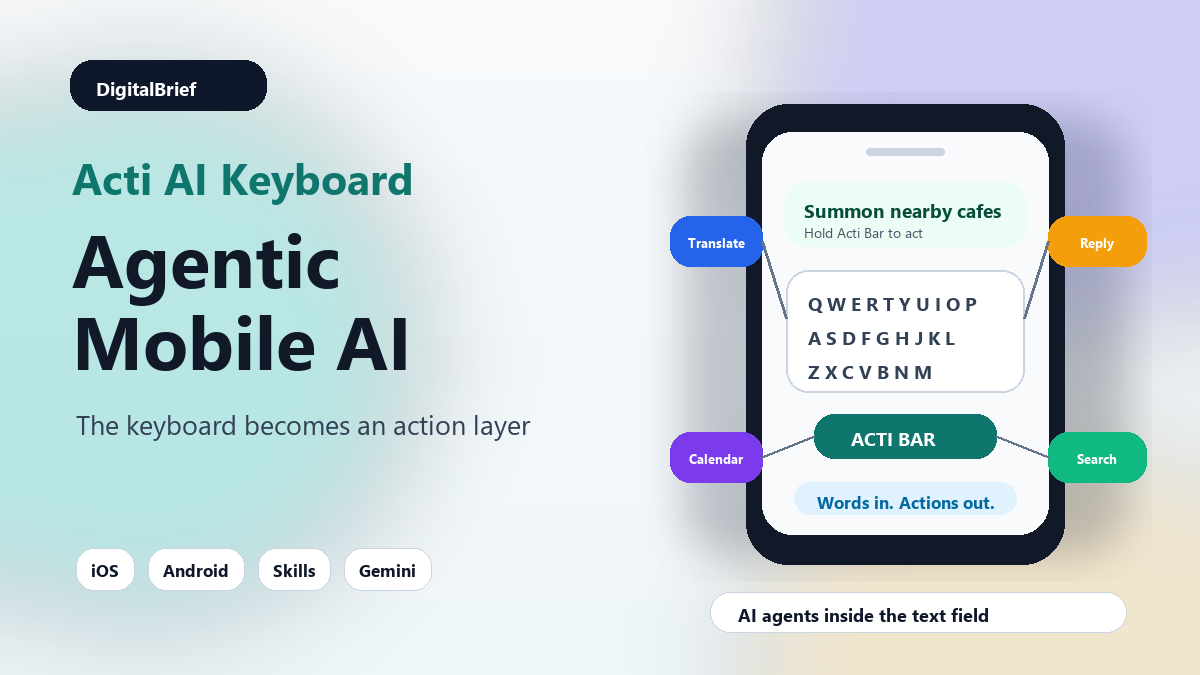
It is an AI keyboard for iOS and Android that tries to put agents directly inside the place where most mobile work begins: the text field.
That sounds simple. But it touches a much larger question in consumer AI right now.
Where should AI actually live?
Should it live inside a separate chatbot app? Inside the operating system? Inside email? Inside WhatsApp? Inside your browser? Or should it live inside the keyboard, where you already type messages, emails, prompts, notes, posts, searches, and tasks all day?
Singapore-based Acti is betting on the keyboard.
TechCrunch reported that Acti launched its agentic keyboard on June 30, 2026, for both iOS and Android. The app lets users call AI help from inside other apps instead of constantly jumping to a separate assistant. Acti’s own website describes it as “the world’s first agentic keyboard” and uses a very clear promise: words in, actions out.
Honestly, that is a clever place to fight the AI assistant war.
Most people do not want to manage another app. They want help at the exact moment they are writing, replying, planning, sharing, translating, summarizing, or sending something.
What Is Acti AI Keyboard?
Acti AI Keyboard is a mobile keyboard that brings AI agents into everyday typing.
Instead of opening ChatGPT, Gemini, Claude, Perplexity, or another tool separately, you can use Acti from the keyboard layer inside supported apps.
The pitch is simple: type your intent, hold the Acti Bar, and let the keyboard turn that intent into an action.
For example, you might ask it to translate a message, share a meeting link, find a restaurant recommendation, summarize a message, rewrite a reply, or pull in useful context from connected tools.
Acti calls these shortcuts “Skills.” A Skill can trigger a specific AI-powered workflow from the keyboard. Users can build Skills in plain language, so they do not need to write code to create a custom action.
That matters because mobile AI has a friction problem.
On a desktop, switching tabs is annoying but manageable. On a phone, app switching feels heavier. You lose the thread. You copy text. You paste it somewhere else. You wait. Then you copy the answer back.
Acti is trying to remove that loop.
Why This Launch Is Trending Now
The timing is not random.
AI agents are everywhere in 2026. Product Hunt’s June 26 leaderboard was packed with agent-related products, including Agent Arena, Gemini Spark, ModuleX, Tines, and other AI workflow tools. The pattern is obvious: builders are moving from simple AI chat to AI systems that can act across tools.
Acti takes that same agent trend and moves it to the consumer phone.
That is why the launch is interesting.
Many AI tools still assume the user will come to the AI. Acti assumes the AI should come to the user.
In my experience, that is usually where useful software wins. The best productivity tools do not make you change your entire day. They quietly remove one repeated irritation.
For mobile users, repeated app switching is a real irritation.
You are replying to a client. You need a calendar link. You switch apps.
You are chatting with a friend. They ask for restaurant ideas. You switch apps.
You are writing a social post. You want a sharper version. You switch apps.
You are reading a long message. You want the key points. You switch apps.
Acti wants the keyboard to become the action layer across all of those moments.
Acti AI Keyboard At A Glance
| Feature | What It Does | Why It Matters |
|---|---|---|
| Agentic keyboard | Brings AI actions into the keyboard layer | Users can get AI help without opening a separate app |
| Acti Bar | Lets users invoke actions while typing | Makes AI feel closer to normal mobile behavior |
| Skills | Custom AI shortcuts for repeated tasks | Turns common workflows into one-key actions |
| Plain-language creation | Users describe what they want a Skill to do | No coding required for basic automation |
| Gemini-powered AI | Uses Google’s Gemini models under the hood | Gives the app speed, multilingual support, and model reliability |
| Local-first approach | Personal context stays on-device by default | Important for keyboard privacy and trust |
| Skills marketplace | Public Skills can be shared and discovered | Could create a mini ecosystem around keyboard actions |
The Simple Explanation
Think of Acti as a shortcut layer for AI actions.
A normal keyboard helps you enter text.
An AI writing assistant helps you improve text.
An agentic keyboard tries to understand what you want to do with that text, then execute the next step.
That is the difference.
If you type “Translate this into Hindi,” a writing assistant may give you a translation.
If you type “Send my Calendly link and say I am free tomorrow afternoon,” an agentic keyboard can theoretically combine writing, formatting, and tool access into one action.
This is where things get interesting.
The keyboard is not just a place for letters anymore. It becomes a place for intent.
Why The Keyboard Is A Smart AI Surface
The smartphone keyboard is underrated.
Most people think of it as boring infrastructure. It appears, you type, it disappears.
But that is exactly why it is powerful.
The keyboard appears in email, messaging apps, social apps, note apps, calendars, search boxes, productivity tools, and forms. It is one of the few interfaces that travels across apps.
That cross-app position is the whole point.
TechCrunch quoted Acti founder Young Wang explaining that user context is fragmented across separate apps. Acti’s argument is that the keyboard can sit across those apps and become a user-owned context layer.
That framing is important.
Right now, AI assistants usually live inside app silos. The assistant in one app may not understand what you were doing in another. A keyboard-based assistant can at least appear at the point of action across many apps.
That does not magically solve all context problems. Mobile operating systems have privacy rules. Apps have limits. Users still need control.
But as an interface idea, the keyboard is surprisingly strong.
Real-World Use Cases
Here are the situations where an AI keyboard like Acti could be genuinely useful.
1. Fast Message Replies
You receive a message and need a clean response.
Instead of copying the message into another AI app, you can ask the keyboard to draft a friendly reply, shorten your tone, translate it, or make it more professional.
This is a simple use case, but it is probably one of the biggest.
2. Translation While Chatting
Acti ships with a translation-style Skill, according to TechCrunch.
That makes sense. Translation is one of the most natural keyboard actions because it happens exactly where typing happens.
For Indian users, multilingual typing is not a niche use case. It is daily life. English, Hindi, Hinglish, regional languages, and work-specific tone often mix in the same conversation.
3. Meeting Links And Scheduling
Another example is sharing a meeting link quickly.
This sounds small, but it is the kind of tiny workflow that wastes time every day. Open calendar app. Copy link. Return to chat. Paste. Add context. Send.
A keyboard Skill that handles this in one action is practical.
4. Social Media Writing
Creators and marketers could use an AI keyboard to turn rough notes into posts, hooks, captions, replies, or short threads.
The advantage is that the AI help happens directly inside the social app.
That is faster than writing in one app and publishing in another.
5. Local Recommendations
TechCrunch gave a simple example: if someone asks where to eat nearby, Acti could drop a local recommendation into the conversation.
That is a good example because it combines context, search, and communication.
The user is not just asking for information. The user needs information formatted for a conversation.
6. Productivity Shortcuts
Acti’s website shows the idea of connecting apps and APIs, including tools like Notion, Gmail, Calendly, weather data, sports stats, and more.
If this works smoothly, the keyboard could become a lightweight automation panel.
Not a full Zapier replacement. Not a developer agent. More like quick mobile workflows for everyday actions.
Acti vs Traditional AI Chatbots
| Area | Traditional AI Chatbot | Acti AI Keyboard |
|---|---|---|
| Where it lives | Separate app or web page | Inside the mobile keyboard |
| Main behavior | Answers prompts | Turns typed intent into actions |
| Best use case | Research, writing, brainstorming | Fast replies, shortcuts, translations, mobile workflows |
| Friction level | Requires app switching | Works closer to the active text field |
| Context challenge | Needs copied input | Can operate where the user is already typing |
| Trust concern | Chat history and prompts | Keyboard privacy and message access |
What Stood Out To Me
What stood out to me is that Acti is not trying to sell AI as a giant new destination.
It is trying to make AI ambient.
That is probably the next phase of consumer AI.
The first phase was novelty: ask a chatbot anything.
The second phase was productivity: write, summarize, translate, code, search, analyze.
The third phase is placement: put AI where the task is already happening.
That is why keyboards, browsers, email clients, calendars, spreadsheets, IDEs, and operating systems are all becoming AI battlegrounds.
The tool that owns the moment of intent has a real advantage.
For Acti, the bet is that typing is the clearest signal of intent on mobile.
Privacy Is The Big Question
Any AI keyboard has to earn trust.
This is not optional.
A keyboard is deeply sensitive. It can touch private messages, work conversations, searches, emails, passwords, addresses, medical questions, financial details, and personal notes.
Acti says it uses a local-first model where personal context stays on the device by default. TechCrunch also reported that the company says it does not access or store private messages, conversations, or personal context unless the user explicitly invokes a feature that needs external processing.
That is the right direction.
But users should still be careful.
Before installing any AI keyboard, ask a few basic questions:
- What data does the keyboard collect?
- When does text leave the device?
- Can the keyboard see everything I type?
- Can I disable cloud processing?
- Which models and APIs are used?
- How are Skills reviewed before public sharing?
- Can I delete my data and history?
Most people miss this part because the demo looks exciting.
But the more powerful an AI keyboard becomes, the more important permission design becomes.
Pros And Cons
| Pros | Cons |
|---|---|
| Reduces app switching on mobile | Requires strong privacy controls to earn trust |
| Makes AI available inside everyday text fields | May feel intrusive if actions are too aggressive |
| Plain-language Skills make automation easier | Complex workflows may still need dedicated apps |
| Useful for translation, replies, links, and quick tasks | Users need to understand when cloud processing is triggered |
| Could become a new consumer AI interface | iOS and Android platform limits may shape what is possible |
Keyword And SEO Opportunity
From an SEO perspective, this topic has several useful keyword clusters.
| Keyword Cluster | Search Intent | Content Angle |
|---|---|---|
| Acti AI keyboard | People want to know what launched | Explainer, review, setup guide |
| agentic keyboard | People want a simple definition | What it means and how it works |
| AI keyboard for iPhone | Users want app recommendations | iOS features, privacy, alternatives |
| AI keyboard for Android | Users want Android options | Android workflow and use cases |
| mobile AI agents | Readers want the larger trend | How agents are moving from apps into interfaces |
| AI productivity tools | Users want practical tools | Daily workflows and best use cases |
The primary keyword for this article is Acti AI keyboard.
Secondary keywords include AI keyboard, agentic keyboard, mobile AI agents, AI productivity tools, AI shortcuts, Gemini AI keyboard, and AI agents for mobile.
The long-tail opportunity is even better:
- What is Acti AI keyboard?
- How does an agentic keyboard work?
- Best AI keyboard for iPhone in 2026
- Best AI keyboard for Android in 2026
- Can AI agents work inside mobile keyboards?
- Is Acti AI keyboard safe?
- Acti AI keyboard vs ChatGPT mobile
How Acti Fits The Bigger AI Agent Trend
Acti is part of a broader move from AI assistants to AI agents.
An assistant helps you think or write.
An agent helps you do.
That is the cleanest way to explain the shift.
We are seeing this everywhere:
- AI coding agents that run tests and edit repos
- AI browser agents that operate web apps
- AI sales agents that qualify leads
- AI support agents that resolve tickets
- AI workflow agents that connect tools
- AI mobile agents that live inside messages, keyboards, and apps
The interesting thing about Acti is that it does not ask consumers to understand the whole agent ecosystem.
It gives them a familiar surface: the keyboard.
That may be its biggest advantage.
Who Should Try Acti First?
Acti makes the most sense for users who do a lot of work from their phone.
That includes:
- Creators writing captions and replies
- Founders managing customer conversations
- Sales teams responding quickly on mobile
- Students translating and summarizing notes
- Remote workers scheduling calls and sharing links
- Community managers handling fast conversations
- Anyone who switches between messaging, email, calendar, and AI apps too often
It is less useful if you only use AI for deep research, long documents, coding, or heavy analysis.
For those tasks, a full-screen AI tool is still better.
Acti’s natural home is quick mobile action.
Pricing And Business Model
TechCrunch reported that Acti’s business model is still developing.
The company plans to make money through subscriptions that offer advanced AI models, higher daily usage limits, and premium features.
That makes sense for this kind of product.
A free version can bring users in. Power users who rely on Skills every day may pay for better models, faster responses, more automation, or larger limits.
The bigger question is whether Acti can build a marketplace around Skills.
If users can create and share useful keyboard actions, Acti could become more than an app. It could become a small workflow ecosystem.
That is hard to execute, but it is a real opportunity.
Acti Funding And Startup Context
Acti is not just a weekend experiment.
TechCrunch reported that the company closed $5.3 million in seed funding led by BITKRAFT Ventures.
The founder, Young Wang, previously worked at Baidu and helped grow Facemoji Keyboard to a large global user base. That background matters because keyboard products are tricky. Distribution, habit formation, latency, privacy, typing quality, and mobile platform constraints all matter.
A flashy AI demo is not enough.
The keyboard still has to be a good keyboard.
If typing feels slow, inaccurate, cluttered, or risky, people will uninstall it quickly.
Best Practices Before Using An AI Keyboard
If you try Acti or any similar AI keyboard, use it thoughtfully.
Start With Low-Risk Apps
Test it in notes, social drafts, or casual messages before using it in sensitive work conversations.
Review Privacy Settings
Check what permissions the keyboard requests and when external processing happens.
Use It For Repeated Tasks
The best use cases are repeatable: translation, summaries, calendar links, reply rewrites, templates, and quick lookups.
Do Not Use It Blindly
Always read before sending. AI-generated replies can sound confident but miss tone, context, or facts.
Keep Sensitive Data Out
Avoid typing passwords, private financial details, confidential client data, or personal health information through any third-party keyboard unless you fully trust its model and settings.
Future Predictions
I think agentic keyboards are early, but the idea will spread.
Here is what likely happens next:
- More AI keyboards will appear for creators, sales teams, and students
- Google and Apple will add more native AI actions into their own keyboards
- Messaging apps will build AI action layers directly into compose boxes
- Keyboard Skills will start looking like mobile workflow templates
- Privacy will become the main differentiator
- AI agents will move from separate apps into smaller interface surfaces
- Users will expect AI help exactly where they are typing
The big risk for Acti is platform pressure.
If Apple, Google, Samsung, or Microsoft builds similar behavior into default keyboards, third-party keyboard apps will have to move fast. They will need better Skills, better personalization, better privacy, and stronger community features.
But for now, Acti has chosen a smart wedge.
FAQ: Acti AI Keyboard
What is Acti AI Keyboard?
Acti AI Keyboard is an agentic mobile keyboard for iOS and Android that lets users invoke AI actions while typing inside other apps.
What does an agentic keyboard mean?
An agentic keyboard does more than suggest words. It can understand typed intent and trigger actions such as translation, rewriting, sharing links, or running custom shortcuts.
Who created Acti?
Acti was founded by Young Wang, who previously worked at Baidu and helped grow Facemoji Keyboard. The company is based in Singapore.
Is Acti available on iPhone and Android?
Yes. TechCrunch reported that Acti launched for both iOS and Android on June 30, 2026.
What are Acti Skills?
Skills are custom AI shortcuts inside Acti. Users can create them in plain language and use them to trigger repeated tasks from the keyboard.
Does Acti use Gemini?
Yes. TechCrunch reported that Acti is powered by Google’s Gemini models, which the company chose for speed, intelligence, multilingual performance, reliability, and cost efficiency.
Is Acti AI Keyboard safe?
Acti says it follows a local-first approach and does not access or store private messages unless a user explicitly invokes a feature that needs external processing. Still, users should review permissions carefully before using any AI keyboard.
How is Acti different from ChatGPT mobile?
ChatGPT mobile is a separate AI app. Acti works from the keyboard layer, so it can help while you are typing inside messaging, email, social, and productivity apps.
Can Acti replace normal keyboards?
It can be used as a keyboard, but whether it replaces a default keyboard depends on typing quality, privacy comfort, speed, language support, and how useful the AI Skills feel in daily use.
What are the best Acti use cases?
The best use cases are quick replies, translation, message rewriting, calendar links, local recommendations, social captions, summaries, and repeated mobile shortcuts.
Does Acti require coding?
No. Users can create Skills by describing what they want in plain language.
Is Acti free?
Acti’s long-term business model appears to include subscriptions for advanced AI models, higher usage limits, and premium features. Users should check the app store listing for current pricing.
Final Thoughts
Acti AI Keyboard is worth watching because it attacks a real problem: AI is still too separate from the place where mobile work happens.
Most people do not want to stop a conversation, open another app, explain the context, copy the output, return, paste, edit, and send.
They want help in the moment.
The keyboard is one of the few mobile surfaces that can offer that.
Acti may or may not become the default AI keyboard for millions of people. That depends on execution, trust, speed, and whether Skills become genuinely useful.
But the idea behind it feels important.
AI agents are moving closer to everyday interfaces. They are leaving the chatbot window and entering browsers, editors, email clients, calendars, and now keyboards.
For users, the key question is simple: does this save time without creating new privacy risk?
If Acti can answer that well, agentic keyboards could become one of the more practical AI productivity trends of 2026.
CTA: If you test Acti, start with one simple workflow: translation, a meeting link, or a reply rewrite. Use it for a week, check whether it actually reduces app switching, and keep privacy settings tight before trusting it with sensitive conversations.
Suggested Visuals
- Featured image: Smartphone keyboard with AI action keys and connected app icons
- Infographic: “Chatbot app vs agentic keyboard workflow”
- Chart idea: AI interfaces moving from apps to ambient surfaces
- Table graphic: Best Acti Skills for creators, students, founders, and sales teams