OpenAI Codex Micro: Why This Tiny AI Coding Keyboard Matters
OpenAI is teasing a new piece of hardware for Codex, and at first glance it looks almost too small to matter.
A compact keyboard. A few physical buttons. A launch date. A collaboration with Work Louder.
But if you follow how developers are actually using AI coding agents in 2026, this is more than a desk accessory. It is a sign that AI coding is moving from chat boxes into real workflow surfaces.
According to The Verge, OpenAI has teased a Codex-focused hardware device built with Work Louder, with more details expected on July 15. A later Verge report also identified the gadget as the Codex Micro, shown at AI Engineer World’s Fair as a keyboard designed to supercharge Codex usage.
That is the hook. The bigger story is what this says about the next phase of AI software engineering.
Quick Answer: What Is OpenAI Codex Micro?
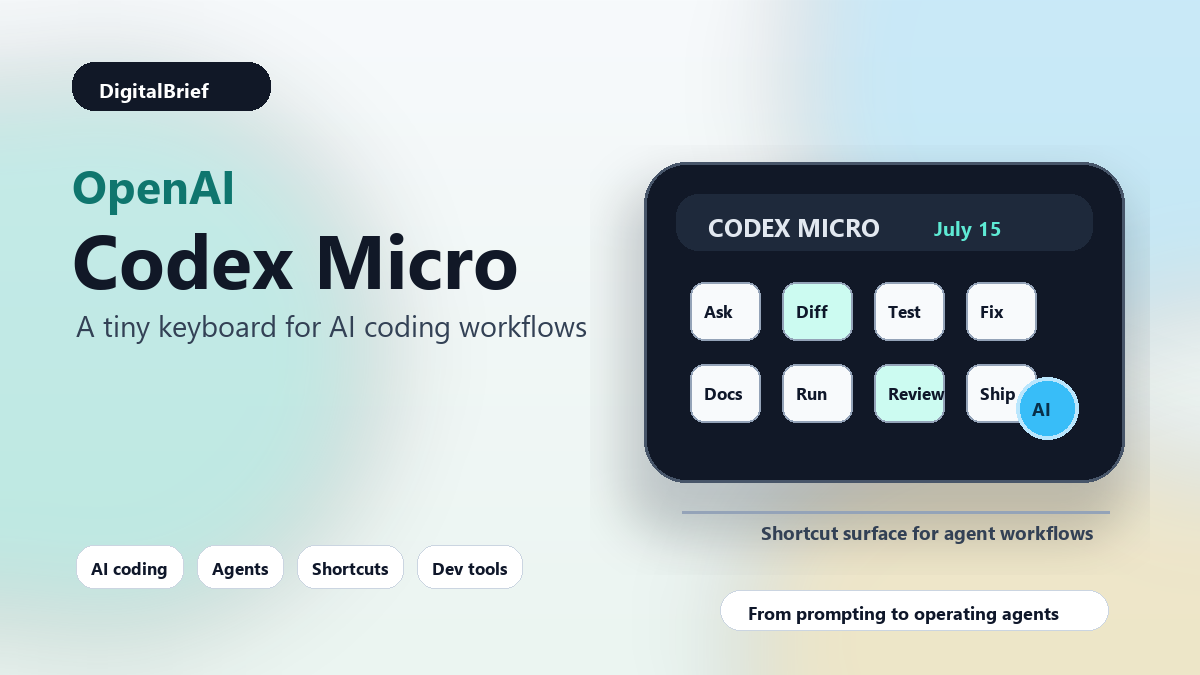
OpenAI Codex Micro appears to be a compact programmable keyboard or macropad designed around Codex shortcuts. It is being developed with Work Louder, a company known for tactile creator keyboards and shortcut-focused hardware.
OpenAI has not yet shared full pricing, availability, supported platforms, or exact shortcut mappings. Based on public reporting and Work Louder’s existing products, the device is likely aimed at developers who use Codex often enough to want faster physical controls for common actions.
In simple terms: it looks like a dedicated control surface for AI coding workflows.
Why This Is Trending Right Now
The timing is important.
AI coding tools are not niche anymore. Product Hunt’s current and recent leaderboards are packed with AI coding agents, vibe coding tools, code review tools, developer automation products, and AI workflow utilities. On June 30, Product Hunt listed tools like ClinePass, PMB, and VisibAI among the day’s top AI-heavy launches, while its trending categories included vibe coding tools, AI dictation apps, AI notetakers, and code review tools.
That tells us something useful: builders are not just asking, “Which model is smarter?” They are asking, “How do I make AI fit into my daily work without slowing me down?”
That is exactly where a physical Codex controller becomes interesting.
Most AI coding products still live inside text boxes, IDE panels, terminal windows, or browser tabs. They are powerful, but they also demand constant context switching. You open the agent. You type a prompt. You approve a diff. You jump to the terminal. You review logs. You ask again. You repeat.
A shortcut device does not magically solve all of that. But it hints at a future where AI coding actions become as natural as save, search, format, run, or commit.
The Real Shift: From Prompting To Operating
Most people still describe AI coding as “prompting.” That word is starting to feel too small.
When a developer uses a modern coding agent, they are not only asking for code. They are operating a system. They are assigning tasks, reviewing changes, running tests, comparing approaches, asking for refactors, checking errors, and deciding what gets merged.
That workflow has more in common with managing a junior engineering assistant than using autocomplete.
This is where physical shortcuts can make sense. A good macropad is not valuable because pressing a button is impressive. It is valuable when it removes repeated friction from a task you perform dozens of times a day.
For example, imagine one button that sends the selected error to Codex. Another that asks Codex to explain the current diff. Another that generates a test for the highlighted function. Another that opens the agent’s task queue. Another that asks for a security review before commit.
None of these ideas require magic hardware. But dedicated hardware can make them feel immediate.
What We Know So Far
| Detail | Current status | Why it matters |
|---|---|---|
| Product name | Reported as Codex Micro | Suggests a Codex-specific workflow accessory, not a general AI gadget |
| Partner | Work Louder | Work Louder already builds compact creator keyboards and macropads |
| Launch timing | More details expected July 15, 2026 | Creates a near-term news cycle and buyer curiosity |
| Target user | Developers and Codex power users | Points to AI coding as a daily professional workflow |
| Open questions | Pricing, platform support, mappings, SDK, availability | These will decide whether it is a serious tool or a fun accessory |
The most important thing we do not know yet is how deep the integration goes.
If Codex Micro is only a branded macropad with preset keyboard shortcuts, it will still appeal to enthusiasts. But if OpenAI exposes deeper Codex actions, profiles, project-aware controls, or team templates, it becomes a much more interesting developer productivity product.
Why Work Louder Is A Logical Partner
Work Louder is not a random hardware name in this story.
The company already sells compact keyboards such as the Creator Micro 2, which it describes as a small tactile device built around layers, keys, radial controls, and shortcut mapping. Its product pages mention features like 13 keys, multiple layers, a radial menu, and a dial depending on the model and configuration.
That background matters because Codex is also a layered workflow.
A developer might need shortcuts for planning, editing, testing, debugging, reviewing, committing, documenting, and asking follow-up questions. A flat keyboard shortcut system can become messy very quickly. A layered device gives power users more room to create repeatable patterns.
In my experience, the best workflow hardware does not replace the keyboard. It handles the handful of actions that are too frequent to keep typing and too important to bury in menus.
How Codex Micro Could Fit Into A Developer Workflow
Let us get practical.
If Codex Micro works well, it could become useful in several everyday coding scenarios.
1. Sending Context To Codex Faster
One common pain with AI coding assistants is context setup.
You want help with a bug, but first you need to gather the file, error message, stack trace, related test, and your intent. If a button can package selected context and send it to Codex, that saves time.
Even a small reduction in friction matters when you repeat it many times per day.
2. Reviewing AI Diffs More Carefully
AI-generated code still needs review. That is not changing.
A useful Codex shortcut could ask the agent to explain its own diff, list risky assumptions, or compare the patch against the original task. This would help developers stay in review mode instead of blindly accepting changes.
Honestly, this may be the most valuable category. AI coding tools are exciting, but trust is the bottleneck.
3. Running Tests And Asking For Fixes
A great AI coding loop is simple:
- Make a narrow change
- Run the relevant test
- Read the failure
- Fix the smallest real issue
- Repeat
Physical shortcuts could make that loop smoother. One button could run the local test command. Another could summarize the failure. Another could ask Codex for a targeted patch.
That may sound basic, but basic loops are where developer productivity is won.
4. Managing Multiple Agent Tasks
Advanced Codex users increasingly work with several agent tasks at once. One agent might investigate a bug. Another might draft tests. Another might update documentation. Another might inspect a dependency issue.
A small control surface could make it easier to jump between these tasks, pause one, approve another, or open the latest result.
This is where things get interesting. The future of AI coding may not be one chat thread. It may be a small command center for many parallel software tasks.
5. Standardizing Team Workflows
For teams, the real value may come from shared presets.
A startup could define a “pre-PR review” shortcut. An enterprise team could define a “security check” shortcut. An open-source maintainer could define a “triage issue” shortcut.
If those workflows become portable, Codex Micro could become part of a broader agent operations culture.
Possible Codex Micro Shortcuts Developers Would Actually Use
| Shortcut idea | What it could do | Best for |
|---|---|---|
| Explain current diff | Ask Codex to summarize changed files, risks, and intent | Code review |
| Generate focused test | Create a test for the selected function or bug | Quality control |
| Fix failing test | Send the latest failure output to Codex for diagnosis | Debugging |
| Refactor selection | Clean up selected code without changing behavior | Maintenance |
| Security pass | Review code for auth, input validation, secrets, and unsafe calls | Production readiness |
| Docs update | Update README, comments, or API docs based on code changes | Developer experience |
| Open task queue | Jump to active Codex tasks or agent threads | Agent management |
Codex Micro Vs Normal AI Coding Tools
Codex Micro should not be compared with a full AI coding assistant. It is not the model. It is not the IDE. It is not the agent.
It is better to compare it with workflow surfaces.
| Tool type | Strength | Weakness | Where Codex Micro fits |
|---|---|---|---|
| AI chat window | Flexible conversation | Manual context setup | Could trigger common prompts faster |
| IDE extension | Close to code | Can become panel-heavy | Could control key IDE-agent actions |
| Terminal agent | Powerful and scriptable | Less approachable for some users | Could map repeated commands |
| Generic macropad | Highly customizable | No native Codex identity | Codex-specific presets may reduce setup |
| Codex Micro | Potentially built around AI coding loops | Details still unknown | Best for frequent Codex users |
Who Should Care About Codex Micro?
Not everyone needs this.
If you use AI coding tools once a week, a dedicated hardware device may be unnecessary. You can keep using keyboard shortcuts, IDE commands, and normal chat prompts.
But some groups should pay attention.
AI Power Users
If Codex is already part of your daily coding loop, Codex Micro could reduce small bits of repeated friction. That is where productivity tools earn their place.
Engineering Managers
Managers should watch the pattern more than the product. Physical controls for AI agents suggest that coding agents are becoming operational infrastructure, not occasional assistants.
Developer Tool Startups
For dev tool founders, this is a signal that the next wave may be about workflow design. The model is only one layer. The interface, shortcuts, review flow, and team adoption path matter just as much.
Open-Source Maintainers
Maintainers live inside repeated workflows: triage, review, test, merge, document, reject, explain. Any device or shortcut system that reduces that loop is worth watching.
Pros And Cons
| Pros | Cons |
|---|---|
| Could make frequent Codex actions faster | May be unnecessary for casual users |
| Turns AI coding into a more tactile workflow | Pricing and availability are unknown |
| May help developers standardize review and testing loops | Could be limited if integration is shallow |
| Strong fit for power users who already like macropads | Another device on the desk is not always welcome |
| Signals serious investment in developer experience | Hardware support can be slower than software updates |
What To Watch On July 15
The July 15 reveal should answer several important questions.
- How much will Codex Micro cost?
- Will it work on Windows, macOS, and Linux?
- Does it require a paid Codex or ChatGPT plan?
- Can users customize every button?
- Will teams be able to share shortcut profiles?
- Will OpenAI provide an SDK or integration layer?
- Can it control IDEs, terminals, browsers, and Codex tasks together?
- Is this a limited collaboration or a long-term hardware line?
The SDK question matters most to me.
If developers can build their own Codex actions, the device becomes a platform. If not, it remains a polished shortcut keyboard for a specific audience.
SEO And Market Opportunity: Why This Topic Has Legs
From a search perspective, this topic sits at a useful intersection.
People will search for the news directly: OpenAI Codex Micro, Codex hardware, OpenAI keyboard, Work Louder Codex. But the longer-term opportunity is broader: AI coding workflows, AI coding agents, developer productivity hardware, and how to use Codex for software development.
That second group is more evergreen.
| Keyword cluster | Search intent | Content angle |
|---|---|---|
| OpenAI Codex Micro | News and product details | What it is, launch date, features, price expectations |
| Codex hardware | Curiosity and comparison | Why OpenAI is making developer hardware |
| AI coding workflow | Practical learning | How developers can use agents without chaos |
| AI coding tools | Tool discovery | Codex, Cursor, Claude Code, Cline, Replit, and alternatives |
| AI agents for developers | Industry trend | How agentic coding is changing software teams |
My Take: The Product Is Small, But The Signal Is Big
What stood out to me is not the hardware itself. It is the assumption behind it.
OpenAI seems to be betting that enough people will use Codex repeatedly, intensely, and professionally that a dedicated shortcut surface makes sense.
That is a meaningful shift.
For years, developer tools were built around editors, terminals, browsers, CI systems, and Git platforms. AI agents are now becoming another first-class part of that environment.
When a tool earns its own keyboard, it usually means it has moved from novelty to habit.
Future Predictions
Here is where I think this goes next.
1. AI Agent Shortcuts Will Become Normal
Whether or not Codex Micro becomes a huge product, the idea will spread. Developers will expect shortcuts for agent actions the same way they expect shortcuts for search, format, build, and debug.
2. Teams Will Create AI Workflow Presets
Companies will build standard prompts and actions for common engineering rituals: bug triage, pull request review, security checks, release notes, and migration tasks.
3. Hardware Will Stay Niche, But Workflow Design Will Go Mainstream
Not every developer will buy a macropad. But every serious AI coding product will need better workflow controls.
4. Trust Features Will Matter More Than Speed
The winning AI coding workflows will not simply generate code faster. They will help developers verify, test, compare, and understand changes faster.
5. AI Coding Will Become More Multimodal
Voice, hardware buttons, IDE panels, terminals, browser agents, and team dashboards will all blend together. The chat box will still exist, but it will not be the only interface.
FAQ
What is OpenAI Codex Micro?
OpenAI Codex Micro is a reported Codex-focused hardware device created with Work Louder. It appears to be a compact keyboard or macropad for AI coding shortcuts.
When will OpenAI reveal Codex Micro?
OpenAI’s teaser points to July 15, 2026, as the date when more details are expected.
Is Codex Micro the same as OpenAI’s Jony Ive hardware project?
No. Current reporting says this Codex device is separate from OpenAI’s broader AI hardware work connected to Jony Ive.
Who is Work Louder?
Work Louder is a hardware company known for compact creator keyboards, macropads, and tactile shortcut devices for productivity workflows.
Will Codex Micro write code by itself?
The hardware itself will not write code. It will likely control or trigger Codex actions, depending on how OpenAI implements the integration.
Will Codex Micro work with VS Code?
OpenAI has not confirmed supported apps yet. Developers will be watching closely for IDE support, especially VS Code, Cursor, JetBrains IDEs, and terminal workflows.
How much will Codex Micro cost?
Pricing has not been announced. Work Louder’s existing compact creator devices can provide rough context, but Codex Micro may have different pricing.
Is Codex Micro useful for beginners?
Probably not at first. Beginners may get more value from learning Codex workflows inside their editor before buying dedicated hardware.
Why would developers need hardware for AI coding?
Developers repeat certain AI actions many times: explain a diff, fix a test, review code, generate docs, or send context. Hardware shortcuts can make those repeated actions faster.
Is this good for software teams?
It could be, especially if teams can share workflow presets. The bigger lesson is that teams should define repeatable AI coding processes instead of relying on random prompts.
What are the best alternatives to Codex Micro?
Generic macropads, IDE shortcuts, Stream Deck-style devices, terminal aliases, and automation tools can already trigger repeated developer workflows. Codex Micro may stand out if it has native Codex integration.
Does Codex Micro prove AI agents are replacing developers?
No. It points more toward developers operating AI agents as part of their workflow. Human judgment, review, architecture, and product thinking still matter.
Final Thoughts
OpenAI Codex Micro may turn out to be a small hardware collaboration. It may also become a useful tool for Codex power users.
But the larger signal is already clear.
AI coding is becoming a daily workflow, not just a demo. Developers are moving from asking chatbots for snippets to managing agents, reviewing diffs, running tests, and building repeatable systems around AI assistance.
That is why this tiny keyboard matters.
If the July 15 reveal brings deep customization, team presets, and real IDE integration, Codex Micro could become one of the more interesting developer productivity products of the year. If it is just a branded shortcut pad, it will still be a useful symbol of where software work is heading.
Either way, DigitalBrief will be watching the launch closely.
CTA
Want more practical breakdowns of AI tools, coding agents, and developer workflows? Follow DigitalBrief.in for clear, human-written analysis of the AI products that actually matter.
Suggested featured image idea: A clean desk scene with a compact Codex-branded shortcut keyboard, code panels, agent task cards, and a subtle DigitalBrief label.
Internal linking suggestions: Link this article to future guides on best AI coding tools, Codex workflows, AI agents for developers, and AI productivity tools for software teams.