What Is Wipe Coding and How to Do It
Table of Contents
ToggleWhat Is Wipe Coding and How to Do It
Wipe coding (often called vibe coding) is an AI‑assisted development process where you build software by conversing with an AI, instead of writing every line of code manually. In simple terms, you describe your app or program in plain language, and an AI model (like ChatGPT, Google’s Gemini, or GitHub Copilot) generates the initial code for you. You then review, test, and refine that code by giving the AI follow‑up instructions. Think of it as having a virtual coding assistant: you focus on the app’s goals and user experience, while the AI handles the boilerplate and syntax. This approach dramatically lowers the barrier to creating software – even people with little coding background can “turn their ideas into interactive projects” quickly.
Why it matters: Wipe/vibe coding marks a shift in how we code. As Google Cloud notes, it “makes app building more accessible, especially for those with limited programming experience,” effectively turning millions of non‑coders into creators. The term “vibe coding” was coined by AI researcher Andrej Karpathy in February 2025 and quickly became a buzzword – Merriam‑Webster listed it as a trending expression, and Collins Dictionary named it the 2025 Word of the Year. In practice, wipe coding lets you rapidly prototype ideas without years of training. Instead of worrying about precise syntax, you can sketch out functionality in English and let the AI generate working code to get started.
How Wipe (Vibe) Coding Works
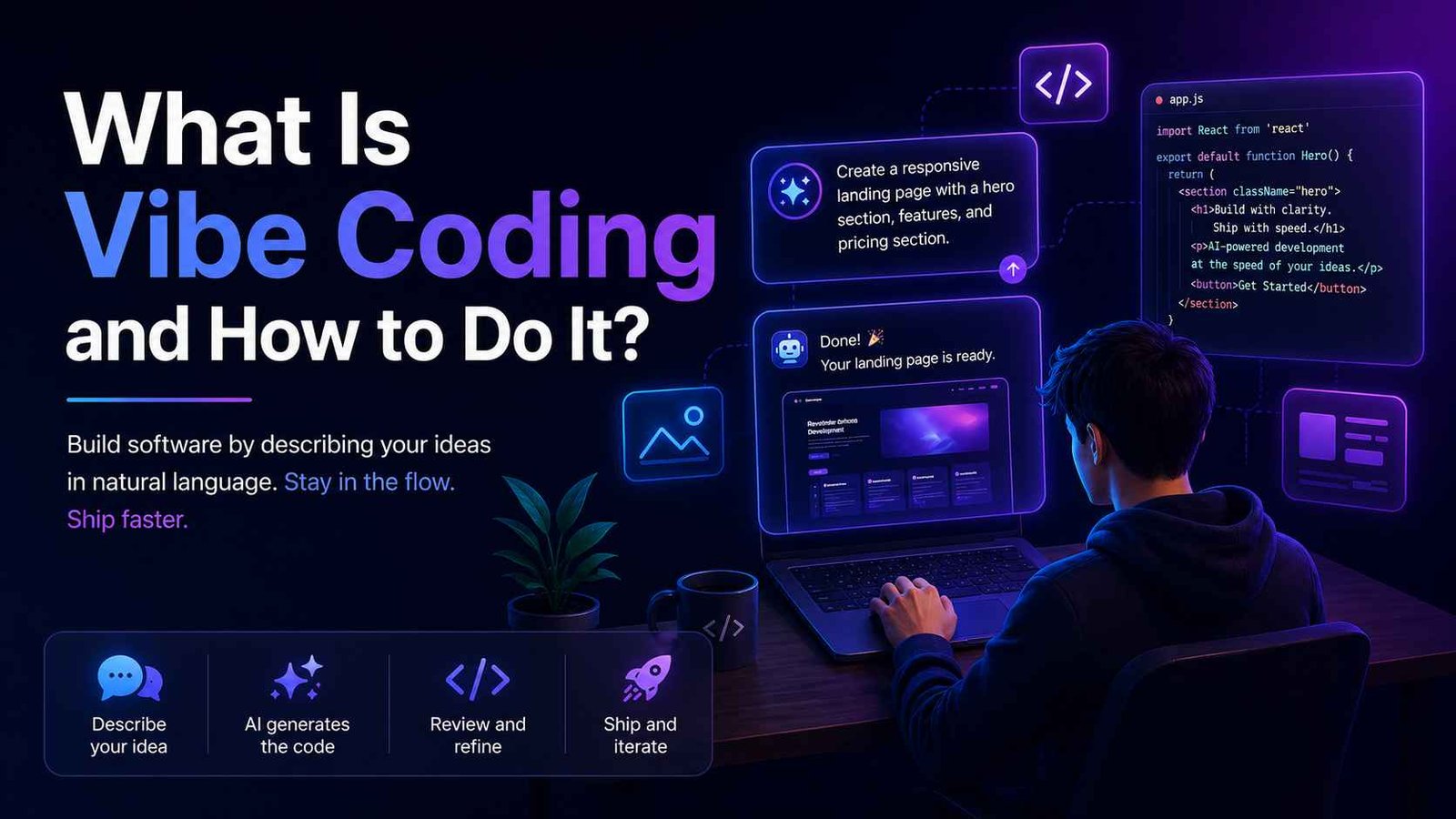
The core process is an iterative loop: you provide a prompt, the AI generates code, you test it, and then you refine it. The steps are:
- Describe your goal – Start with a clear, high-level prompt (in English). For example: “Build a web app with a user login and a todo list.” The more specific (features, UI, tech stack) the prompt, the better the initial result.
- AI generates code – The AI interprets your prompt and writes the initial version of the application. This might include project structure, front‑end and back‑end code, and configuration files.
- Execute and observe – Run or preview the generated code. See what works and what doesn’t. Often, the first pass will have bugs or missing features (which is normal).
- Refine with feedback – Give the AI new instructions to fix issues or add features. E.g., “The list feature is working, but please add error handling if the database is empty.” The AI then edits the code accordingly.
- Repeat until complete – Go back and forth: test again, prompt further refinements (“Make the background color blue”), and iterate. You can also ask the AI to optimize or refactor code for clarity.
In effect, wipe coding operates on two levels: a code‑level loop (tight conversation about one function) and an app‑level lifecycle (ideate the full app, generate scaffolding, add features, deploy). Many AI tools (like Google AI Studio) provide a live preview and chat interface, so you can see changes in real time.
Key Benefits & Use Cases
- Rapid Prototyping – Build mini‑apps (to‑do list, quiz, simple data visualizers) in minutes. The AI writes repetitive parts, so you see results fast.
- Accessibility – As Karen Brennan from Harvard notes, “It’s no longer necessary to know how to code to design a website or an app.” Wipe coding empowers marketers, students, and designers to bring ideas to life without deep programming skills.
- Creative Focus – You spend time on design, logic, and features, rather than syntax. The AI handles boilerplate (layouts, CRUD operations, API calls).
- Learning Aid – Beginners learn by example. The AI’s code can teach concepts; ask it to explain snippets or adjust code.
Y Combinator reported that ~25% of 2025 startups had codebases that were mostly AI‑generated, reflecting how tech entrepreneurs are already leveraging vibe coding. Even Linus Torvalds has used it – he used Google’s AI tools to write part of an audio tool, noting that “the Python visualizer tool has been basically written by vibe‑coding.”
Wipe Coding vs. Traditional Programming
| Aspect | Traditional Coding | Wipe (Vibe) Coding |
|---|---|---|
| Primary Input | Detailed code or pseudocode | Natural language prompts and feedback |
| Developer Role | Architect, writer, debugger | Prompter, reviewer, tester |
| Coding Expertise | High (languages, syntax, algorithms) | Lower barrier (focus on functionality) |
| Speed of Dev | Generally slower, step‑by‑step | Potentially much faster prototyping |
| Error Handling | Manual debugging (read stack traces) | Conversational: ask AI to fix or explain errors |
| Maintainability | Controlled by developer (clean code practices) | Depends on AI output quality; requires thorough review |
As this comparison shows, wipe coding swaps hands‑on implementation for high‑level direction. You learn skills like prompt writing and AI feedback, rather than memorizing every command.
Common Tools and Platforms
You can do wipe coding with various AI tools. Some top examples:
- ChatGPT/GPT-4 (OpenAI) – Chat interfaces that generate code snippets, entire functions, or explanations. Pair it with Copilot for real coding.
- GitHub Copilot / OpenAI Codex – An AI pair programmer plugin for IDEs (VS Code, etc.) that suggests completions based on comments or partial code.
- Google Gemini (AI Studio & Code Assist) – AI Studio generates full web apps from prompts; Code Assist works like Copilot inside editors.
- Replit AI Agents – An online IDE with AI agents (e.g., Cline or Windsurf) that spin up projects from descriptions and handle deployment.
- Lovable, Base44, Bolt etc. – Specialised vibe‑coding platforms for novice‑friendly app building. DreamHost’s testing found Base44 to be effective.
- Command‑Line AI (Gemini CLI) – For terminal‑savvy devs, an AI co‑pilot in your command line that can analyze codebases and run AI commands.
In summary, tools range from general AI chatbots (GPT, Claude) to IDE plugins (Copilot) to full platforms (Google AI Studio, Replit). Using multiple tools can help: e.g., ask ChatGPT to brainstorm, Copilot to write code, and Google AI Studio to scaffold a frontend.
Getting Started: How to Do Wipe Coding
- Set up your environment – Beginners often start with ChatGPT (no install) or Replit (in‑browser). If you use an IDE, install an AI plugin like GitHub Copilot.
- Define a clear objective – For example, “a quiz app in JavaScript where users answer trivia and see their score.” A goal‑oriented prompt yields better results.
- Prompt the AI – Give that description to your chosen AI. In ChatGPT, type your request directly. In an IDE with Copilot, write a comment like
// A quiz app with trivia questions and scoring. - Review and run code – Copy the generated code into your editor or run it. Look for immediate errors or missing pieces.
- Refine – Use follow‑up prompts: “Add a timer to the quiz,” or “Change the UI to blue theme.” If there’s a bug, share the error message: “The app crashed on empty input – please fix that.”
- Iterate – Continue the loop: refine the prompt, regenerate or modify code, and retest. You can also manually tweak code between AI sessions.
- Test thoroughly – Test edge cases. Ask the AI to write unit tests (“create tests for this function”) using frameworks like pytest or Jest.
- Finalize and deploy – Once happy, deploy your app. Many platforms let you publish with one command (e.g., Replit or Google AI Studio with Cloud Run).
Throughout, monitor the AI’s output. As Marcio Oliveira recommends, feed the latest code back into the prompt context to fix bugs, or instruct the AI to “search for the cause of this error” (some advanced AIs can do this). Stay hands‑on – use the AI as a collaborator, not an autopilot.
Limitations & Risks
Wipe coding is exciting, but it has caveats. Critics warn of “the vibe coding hangover.” Common issues include:
- Security and Quality – The AI may not follow best security practices. Studies found AI‑generated code often contains vulnerabilities. Always review for common security flaws (injection, authentication errors) and ask the AI to address them.
- Hidden Complexity – Because the AI writes code, you might not fully understand how it works, making maintenance hard. Add comments and refactor as needed.
- Over‑Reliance on AI – As one commentator puts it, if you let the AI do “everything” without scrutiny, that’s not true vibe coding – it’s just using an AI typewriter. Experts like Andrew Ng caution against blindly “going with the vibes”.
- Learning Gaps – Relying too much on AI might slow your own learning of programming fundamentals. Use AI explanations as teaching moments: e.g., “What does this loop do?” in your prompts, and verify the answers.
Treat wipe coding as you would any tool. Leverage its speed, but apply rigorous code review and testing before considering any AI‑generated code “finished.”
Expert Perspectives & Industry Adoption
Andrej Karpathy, who coined “vibe coding,” envisioned it as a new paradigm where developers “set the vibe” and let AI fill in the details. Y Combinator’s 2025 research showed a quarter of startups now rely heavily on AI‑generated code. Even Linux’s Linus Torvalds admitted using Google’s “antigravity” vibe coding tools to write part of an audio visualizer, stating: “the Python visualizer tool has been basically written by vibe‑coding.” The Harvard Gazette interview with Karen Brennan reinforces that vibe coding “liberates people from knowing syntax, but human input and oversight is important.” These perspectives validate that wipe coding is not a fad – it is reshaping how both newcomers and veterans build software.
How This Guide Compares to Top Resources
To help you see why this article stands out, here is how it fills the gaps left by other popular pages on vibe/wipe coding:
| Competitor | Focus | Strengths | Weaknesses / Content Gaps |
|---|---|---|---|
| Google Cloud – “What is Vibe Coding?” | AI coding with Google’s tools | Authoritative, detailed workflow, examples of prompts. | Overly Google‑specific; minimal discussion of drawbacks. |
| IBM “What is Vibe Coding?” | Definition & implementation steps | Concise, practical steps (choose tool, refine prompts). | Very high‑level; lacks depth, use cases, critical perspective. |
| Wikipedia “Vibe coding” | Concept overview & history | Comprehensive definition, historical context, pros/cons. | Too long/technical for casual readers; not a how‑to guide. |
| DreamHost “9 Best Vibe Coding Tools” | Tool reviews | Hands‑on testing, beginner‑friendly ratings. | No “what is” introduction or concept clarity. |
| Harvard Gazette (Karen Brennan interview) | Expert opinion & education | Reputable source, emphasizes learning ease (“no need to code”). | Interview style; lacks step‑by‑step advice or SEO structure. |
This article combines clear definitions, step‑by‑step guidance, a wide range of tools (ChatGPT, Gemini, Copilot, Cursor, Windsurf, etc.), benefits and risks, expert quotes, and a complete FAQ – making it the most holistic guide on wipe coding available today.
Frequently Asked Questions (FAQ)
What is wipe coding (vibe coding) in simple terms?
Wipe coding (also known as vibe coding) means creating software by telling an AI what you want, instead of writing every line of code yourself. You describe your app’s needs in plain language, and an AI tool (like ChatGPT, GitHub Copilot or Google’s Gemini) generates the initial code. You then refine that code by testing it and asking the AI to improve it. This way, the AI handles the technical details, and you focus on the app’s goals and design.
Do I need to be a programmer to use wipe coding?
No prior coding experience is strictly required to start wipe coding. Because the AI writes code for you, wipe coding lowers the barrier to entry. Beginners can often pick it up quickly by iterating on prompts. However, basic understanding of logic and concepts (like variables, functions, and data flow) will help you give the right instructions and tweak the results. As one expert noted, you’ll still want to understand what the AI’s code does (rather than blindly trusting it).
How is wipe coding different from traditional programming?
In traditional programming, you write each line of code yourself and debug manually. With wipe coding, you prompt an AI to generate code. Traditional coding is code-first (you handle syntax and implementation details), whereas wipe coding is idea-first (you describe the goal and the AI writes code). Wipe coding can be much faster for prototyping, but it requires careful review of the AI’s output.
What tools do I need to do wipe coding?
Any AI coding assistant or platform that accepts natural-language prompts can be used. Common tools include ChatGPT/GPT‑4, Google Gemini, GitHub Copilot (Codex), and Claude. There are also specialized environments like Replit with AI agents (such as Cline or Cursor), Lovable, Windsurf, Base44, or Google AI Studio. The key is that the tool should let you describe code in plain English.
How do I write a good prompt for wipe coding?
A clear, specific prompt is crucial. Start with a high-level goal (e.g., “Create a task manager web app”). Include details like desired features, technologies, and constraints. Provide enough context so the AI understands the project. After the AI generates code, refine the output with follow‑up prompts to add features or fix issues. Good prompting is iterative: clarify or break the task into smaller parts if needed.
Can wipe coding replace traditional developers?
Wipe coding is a powerful aid, but it isn’t a full replacement for skilled developers. AI-generated code often needs human review. Expert developers will still design architecture, handle complex logic, and ensure maintainability. Wipe coding is great for prototyping and lowering entry barriers, but professional projects usually combine AI tools with developer oversight.
Is wipe coding safe or reliable?
Wipe coding can introduce bugs or security issues if used carelessly. Because AI may not fully understand security, its code might have hidden flaws. Some AI tools have accidentally deleted files or produced insecure code. Always review and test any AI-generated code. Use static analysis, add error handling, and treat wipe coding code as a draft requiring your judgment.
What can I build with wipe coding?
You can build many projects: web apps, scripts, data analysis tools, games, etc. Wipe coding is especially handy for prototyping simple apps (to‑do lists, calculators, chatbots, etc.). Once you have a working prototype, you can continue developing it. Very complex systems may still need manual coding, but for many learning and hobby projects, wipe coding accelerates development.
How do I get started with wipe coding?
- Pick a tool: choose an AI coding assistant (e.g., ChatGPT or Replit).
- Draft a project idea: decide on a simple app goal.
- Write your first prompt: describe the project in plain language.
- Review output: run the AI-generated code and note errors.
- Refine: give the AI feedback or ask it to add features/fix errors.
- Iterate: repeat until the app works. Use AI to write tests or docs too. Start small and learn as you go.
How does wipe coding help me learn coding?
Wipe coding lets you see working code generated from your ideas. Beginners can focus on concepts (like functionality) without getting stuck on syntax. You also learn by reviewing the AI’s code: ask it to explain snippets or tweak the code yourself. Over time, you pick up coding patterns and logic. It’s a stepping stone – eventually understanding fundamentals will be important.
Further reading: Check out our guides on AI coding assistants, prompt engineering, and code review best practices. For external references, see Google Cloud’s overview, IBM’s definition, and Collins Dictionary 2025 Word of the Year.