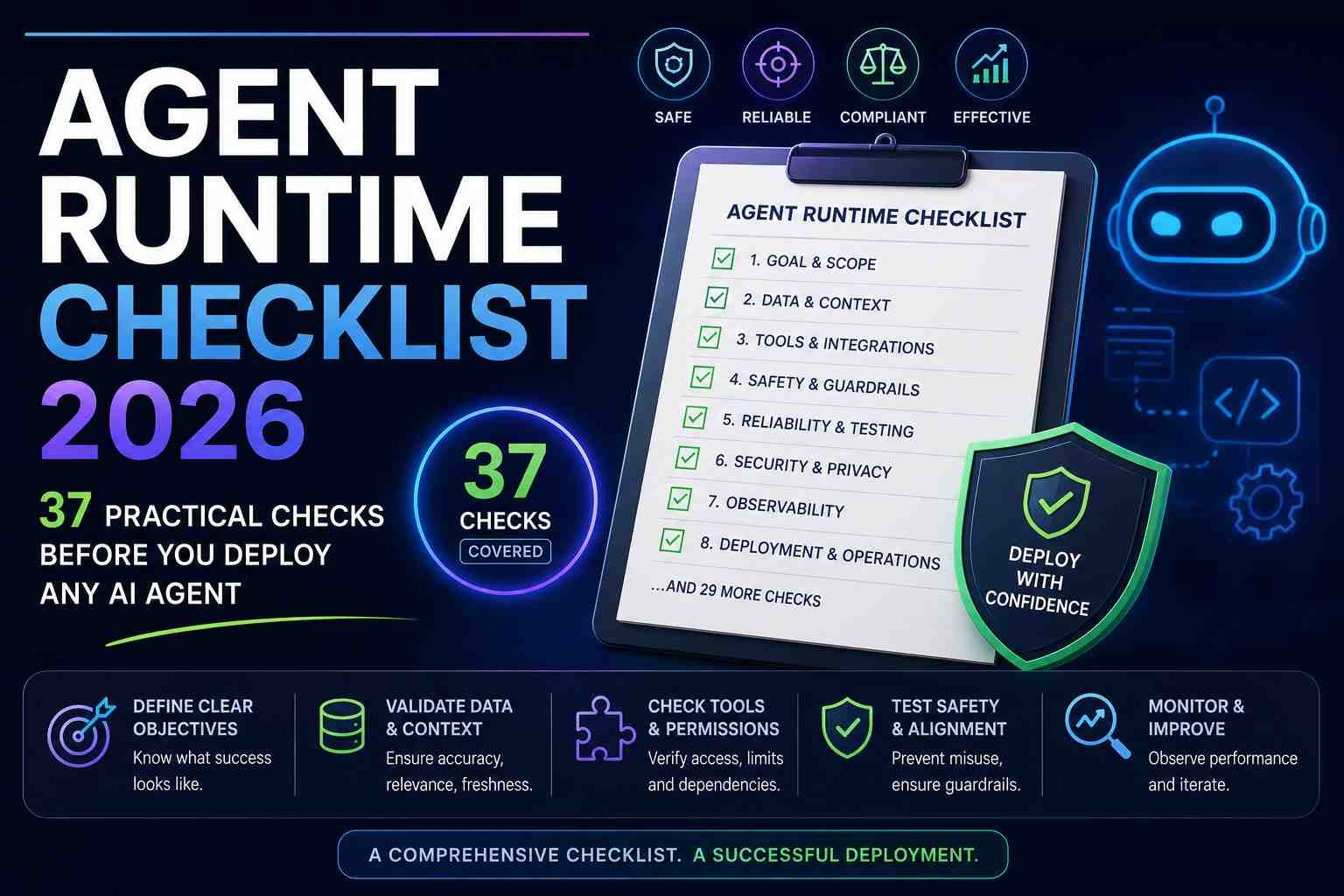
Agent Runtime Checklist 2026: 37 Practical Checks Before You Deploy Any AI Agent
Most agent projects fail for boring reasons.
Not because the model is weak.
Not because the demo looked bad.
They fail because runtime basics were skipped.
If you’re about to ship an AI agent, this checklist will save you time, incidents, and expensive rework.
I wrote it like a pre-flight list you can actually use with product, engineering, and operations teams.
Who This Checklist Is For
- Startup teams shipping their first production agent
- SaaS teams adding AI automation features
- Enterprise teams scaling internal copilots
- Agencies building and maintaining agent workflows for clients
Use this before launch, and again every time you add a new tool/action path.
The 37-Point Agent Runtime Checklist
A) Scope and Task Design (Checks 1-6)
- 1. One clear job: Is the agent’s primary task measurable in one sentence?
- 2. Success metric: Do you track completion quality and not just completion count?
- 3. Failure definition: Have you defined what “bad completion” looks like?
- 4. Human handoff: Can the agent escalate to a person when confidence is low?
- 5. Action boundaries: Are high-risk actions explicitly blocked by default?
- 6. Idempotency: Can retries run safely without duplicate side effects?
B) Permissions and Security (Checks 7-12)
- 7. Least privilege: Does each tool connection have minimum required access only?
- 8. Secret isolation: Are API keys scoped per environment and rotated?
- 9. File controls: Is file read/write access limited to approved paths?
- 10. Prompt injection defense: Are untrusted inputs filtered and classified?
- 11. Output policy: Do you block policy-violating content before delivery?
- 12. Audit trail: Can you trace who triggered what, and when?
C) Runtime Reliability (Checks 13-18)
- 13. Timeout strategy: Do all calls have realistic timeouts?
- 14. Retry policy: Are retries capped with backoff and jitter?
- 15. Checkpointing: Can long tasks resume after interruption?
- 16. Fallback model/tool: Is there a backup path if the primary fails?
- 17. Concurrency limit: Do you prevent overload from spikes?
- 18. Dead-letter queue: Are failed tasks captured for review?
D) Data Quality and Context (Checks 19-24)
- 19. Source quality: Does the agent use trusted, current data sources?
- 20. Context window hygiene: Is irrelevant context removed before calls?
- 21. Structured inputs: Are tool payloads validated against schema?
- 22. Grounding rules: Must the agent cite internal sources for key claims?
- 23. Freshness logic: Are stale records detected and handled?
- 24. PII controls: Is sensitive data masked in prompts and logs?
E) Observability and Debugging (Checks 25-30)
- 25. End-to-end traces: Can you inspect every step in a task chain?
- 26. Token/cost tracking: Do you monitor cost by workflow and customer?
- 27. Latency budgets: Is there a target p95 and p99 for user-facing tasks?
- 28. Error taxonomy: Are errors grouped by type for faster fixes?
- 29. Quality sampling: Are outputs periodically reviewed by humans?
- 30. Incident alerts: Do failures page the right owner quickly?
F) Product and Operations Readiness (Checks 31-37)
- 31. UX transparency: Does the UI clearly show what the agent is doing?
- 32. Undo pathway: Can users reverse risky actions where possible?
- 33. Approval gates: Do critical actions require explicit approval?
- 34. Rollout plan: Are you launching gradually by segment?
- 35. Kill switch: Can you disable the agent path instantly?
- 36. Runbooks: Do support and ops have response playbooks?
- 37. Post-launch review: Is there a 7-day and 30-day performance audit planned?
Priority Table: What to Fix First
| Priority | What to Address | Why It Comes First |
|---|---|---|
| P0 | Permissions, prompt-injection defense, approval gates, kill switch | Prevents high-impact security and trust failures |
| P1 | Timeouts, retries, checkpointing, fallback paths | Reduces outage frequency and failed automations |
| P2 | Tracing, quality sampling, cost instrumentation | Improves optimization and long-term reliability |
| P3 | UX polish, advanced routing logic, automation refinements | Boosts adoption after core safety/reliability is stable |
Sample Runtime Readiness Scorecard
| Area | Score (0-5) | Launch Threshold |
|---|---|---|
| Security and permissions | __ | Minimum 4 |
| Reliability and recovery | __ | Minimum 4 |
| Observability | __ | Minimum 3 |
| User control and UX clarity | __ | Minimum 3 |
| Operational readiness | __ | Minimum 4 |
As a rule, don’t fully roll out if any P0 or P1 item is unresolved.
Common Runtime Mistakes We Keep Seeing
- Shipping with no rollback strategy
- Letting the agent call tools without strict schema validation
- Relying on prompt instructions for policy instead of enforcement layers
- Ignoring cost blowups from recursive agent loops
- Skipping chaos testing for API or tool failures
Honestly, these are fixable with process, not magic.
Most teams just need a checklist and ownership by area.
30-60-90 Day Implementation Plan
Days 1-30
- Complete checks 1-18 and block launch until done
- Deploy basic traces and incident alerts
- Pilot with one low-risk workflow
Days 31-60
- Complete checks 19-30
- Run adversarial tests for injection and permission abuse
- Tune latency and cost thresholds
Days 61-90
- Complete checks 31-37
- Roll out by segments with weekly QA audits
- Create repeatable templates for new agent workflows
Checklist by Platform: OpenAI, Google, Microsoft
| Platform | Where to Focus Most | Practical Note |
|---|---|---|
| OpenAI Agents SDK | Sandbox permissions, snapshot/rehydration, tool schema strictness | Great flexibility, but needs careful runtime discipline |
| Google Genkit Middleware | Policy interception, request/response filters, observability hooks | Strong for governance layers across app routes |
| Microsoft Copilot Studio | Approval workflows, enterprise policy mapping, connector governance | Fast operational fit in Microsoft-heavy organizations |
Future Outlook: Why Runtime Maturity Will Define Winners
By late 2026, most teams will have access to powerful models.
That won’t be the differentiator.
The edge will come from who runs agents safely, cheaply, and reliably at scale.
Runtime maturity is becoming the moat.
FAQ: Agent Runtime Checklist
1) What is an agent runtime checklist?
It is a deployment readiness list covering security, reliability, observability, and operational controls for AI agents.
2) How many checks are enough before launch?
For production, complete all P0 and P1 checks first, then phase in the rest during controlled rollout.
3) Do startups need this level of rigor?
Yes. Startups feel runtime failures faster because teams are small and recovery budgets are tighter.
4) What is the highest-risk missed item?
Missing permission boundaries and approval gates for high-impact actions.
5) Should policy live in prompts?
No. Prompts can guide behavior, but enforcement should live in middleware/runtime controls.
6) How do I measure runtime quality?
Track task success quality, rework rate, incident count, p95 latency, and cost per completed task.
7) Is checkpointing really necessary?
For long or multi-step workflows, yes. It prevents expensive restarts and improves reliability.
8) How often should we audit the checklist?
At minimum: before launch, after major workflow changes, and monthly for active production agents.
9) Can one checklist work across platforms?
Yes. Core controls are universal; implementation details vary by platform.
10) What should teams do right after publishing this checklist internally?
Assign owners per checklist section and set dates for unresolved P0/P1 items.
Final Thoughts
Great agent products feel simple on the surface.
But under the hood, they run on disciplined runtime engineering.
If you apply this checklist before launch, you’ll avoid most painful incidents that derail AI projects.
Want the next resource?
DigitalBrief can publish a downloadable Agent Runtime Audit Template (Notion + spreadsheet version) so your team can score workflows weekly and track reliability trends over time.
Deep-Dive: Reliability Testing Matrix You Can Run This Week
Teams often ask, “What should we test first if we only have one week?”
Use this matrix and run every scenario at least 20 times.
| Test Scenario | Goal | Pass Condition | Owner |
|---|---|---|---|
| Upstream model timeout | Validate retry/fallback | Task completes or gracefully fails with alert | Backend engineer |
| Tool API 500 errors | Confirm error classification | Error type captured and surfaced in dashboard | Platform engineer |
| Rate-limit burst | Protect service stability | Queue/backoff works, no cascading failure | SRE/DevOps |
| Malformed tool payload | Schema validation check | Request blocked pre-execution | App engineer |
| Prompt injection in user input | Policy enforcement check | Unsafe action denied and logged | Security lead |
| Checkpoint recovery after crash | Resume continuity | Workflow resumes from last safe state | Runtime owner |
What stood out to me across teams is that testing usually covers model output quality, but not runtime stress behavior.
This is where incident rates spike after launch.
Governance Checklist for Regulated or Enterprise Workflows
If your agent touches financial, healthcare, legal, or customer-support operations, add this governance layer.
- Policy mapping: Map each workflow to internal policy IDs and approval rules.
- Retention policy: Define what logs are stored, masked, and deleted.
- Action provenance: Store action ID, user context, tool invoked, output hash.
- Role-based approvals: Separate requester and approver roles for sensitive actions.
- Vendor review cadence: Quarterly review of model/tool/provider changes.
- Exception workflow: Clear process for emergency overrides with audit.
Most organizations do not need heavy governance everywhere.
But they do need strict controls for the top 20% of high-impact workflows.
Cost Control Checklist (So the Agent Doesn’t Burn Budget)
Agent cost surprises are common, especially when loops and tool retries multiply hidden usage.
| Cost Control | What to Configure | Why It Matters |
|---|---|---|
| Per-task token cap | Maximum token budget by workflow type | Stops runaway sessions |
| Per-user daily budget | Soft/hard caps by account tier | Prevents abuse and margin loss |
| Tool call ceiling | Max external actions per run | Controls recursive loops |
| Adaptive model routing | Use smaller model for low-risk subtasks | Improves gross margins |
| Cache policy | Cache deterministic steps and retrieved context | Cuts repeat compute |
In my experience, cost control becomes much easier when every workflow has an explicit “unit economics owner.”
User Experience Checklist (Trust and Adoption)
Runtime excellence is invisible unless users feel in control.
- Show an action timeline so users see what the agent did.
- Display confidence level and rationale for important decisions.
- Add “pause” and “stop” controls during long executions.
- Use plain-language error messages with next best step.
- Offer one-click escalation to human support.
- Let users configure notification frequency for agent updates.
People adopt AI faster when they can predict behavior.
Predictability comes from transparent UX, not just model quality.
Real-World Rollout Example: Support Agent Modernization
Let’s make this concrete with a typical support automation case.
Goal: reduce ticket triage time by 40%.
Workflow: classify intent, fetch account context, propose response draft, escalate risky cases.
What teams usually do wrong
- Skip approval gates for account-level changes
- Don’t separate low-risk FAQs from high-risk billing actions
- Fail to monitor model/tool drift after launch
What a better rollout looks like
- Phase 1: FAQ-only automation with strict no-action policy
- Phase 2: Assisted drafts with mandatory human review
- Phase 3: Limited autonomous actions under policy constraints
- Phase 4: Full automation for approved low-risk intents
This phased model protects user trust while still delivering measurable ROI.
Pros and Cons of Using a Checklist-Driven Runtime Strategy
| Pros | Cons |
|---|---|
| Fewer launch incidents | Requires up-front coordination across teams |
| Clear ownership and accountability | Can feel slower in early prototyping |
| Stronger stakeholder confidence | Needs regular audits to stay useful |
| More predictable cost and latency | Extra instrumentation effort required |
| Higher enterprise readiness | Documentation overhead if unmanaged |
Team Roles: Who Owns Which Checklist Block?
| Role | Primary Ownership | Secondary Ownership |
|---|---|---|
| Product manager | Scope, UX transparency, rollout gating | Success metrics and adoption tracking |
| Backend/platform engineer | Retries, checkpointing, fallback logic | Tool schema validation |
| Security engineer | Permissions, secrets, policy enforcement | Injection testing and audit rules |
| SRE/DevOps | Alerts, latency, capacity, incident ops | Cost and uptime dashboards |
| QA/operations | Output quality sampling and audits | Post-launch review loop |
Advanced FAQ: Implementation Questions Teams Ask
11) Should every action require approval?
No. Use risk tiers. Low-risk tasks can be autonomous, medium-risk tasks can require soft confirmation, and high-risk tasks should require explicit approval.
12) How do we set confidence thresholds?
Start with conservative thresholds from historical QA samples, then calibrate monthly based on false positive and false negative costs.
13) What’s a good p95 latency target?
For user-facing tasks, many teams target under 5-8 seconds for simple flows and under 15 seconds for multi-step workflows.
14) How often should we rerun chaos tests?
At least monthly, and always after any major tool integration or model/provider change.
15) How do we prevent infinite loops?
Set hard recursion depth limits, per-run tool call caps, and loop-pattern detectors based on repeated state signatures.
16) Is post-deployment human review still needed?
Yes. Even mature agents drift due to data changes, policy updates, and upstream platform behavior shifts.
17) What if different teams own different agent components?
Create one shared runtime contract document and assign a single incident commander role per workflow.
18) How do we communicate reliability to business teams?
Use a weekly one-page scorecard: task success quality, incidents, cost per task, and top three risks with mitigation status.
Source Context
- OpenAI Agents SDK platform updates (April 2026)
- Google Genkit Middleware announcement (May 2026)
- Microsoft Copilot Studio governance and workflow updates (April 2026)
- Cross-industry DevOps and reliability best practices for production AI systems